To illustrate this postulat, I take enterprise-size opensource model (Liferay with150+ entities) upon which I apply minuteproject tracks.
It will quickly appear that performing 'bulk reverse-engineering' have strong limitations. Meanwhile by applying conventions deduced from the 'Reverse-Analysis' discipline, it will be possible to overcome them.
The generation will run releasing in couple of seconds (3 to 10) hundreds of artefacts.
Following Minuteproject philosophy, you'll will have to write 0 (Zero) LOC to get a working result and this can be achieved within 5 min-.
Eventually some code will be written on top and the result will be tested.
The technologies discussed will be:
- JPA2 with Hibernate implementation
- Querydsl
- Ehcache
- Fitnesse
But other MP tracks can be applied.
The
conclusion resumes the productivity benefit at project and enterprise
level of embracing MinuteProject productivity philosophy.
Liferay
Liferay is an opensource portal, this article only focus on the database model.
Liferay Model
Setup
The model is install on mysql database.
Setup
The model is install on mysql database.
- Download Liferay Model https://sourceforge.net/projects/lportal/files/Liferay%20Portal/6.0.6/liferay-portal-sql-6.0.6-20110225.zip/download
- Unzip
- On liferay-portal-sql-6.0.6-20110225\liferay-portal-sql-6.0.6\create
- Execute mysql -u root -p xxxx < create-mysql.sql
Reverse-Analysis crash course
At first sight 150+ tables, 0 views.
Some tables start with QUARTZ, those are likely to be shipped with the Quartz scheduling framework, so they should be excluded from the generation.
Some tables start with QUARTZ, those are likely to be shipped with the Quartz scheduling framework, so they should be excluded from the generation.
At second sight (on mysql installation)
Entity with primary key but no foreign keys. => No relationships?
Mysql schema primary key are not autoincrement.
If
reverse-engineering is performed as-is, then the bulk resulting
artefacts in JPA2 will contain no relationships (no @OneToMany,
@ManyToOne and @ManyToMany), so the resulting value will be quite poor
(no graph navigation, query link to be done manually, no type safe
benefit of Querydsl or Metamodel...)
Relation detection convention
Since the relationships are not formalised in terms of constraint, does it mean that there is none?
In
fact, when having a deeper look inside the tables, some fields have
name such as USER_ID and there is a strong chance that they are used for
a relationship link with the User_ table primary key.
Let's assume it.
Since
in minuteproject configuration the user can perform some enrichment and
one of this enrichment consists in defining relationship, it is
possible to enrich every table containing the field USER_ID by
indicating it acts as a foreign key towards USER_ table.
// add snippet
It's
fine, but it might be cumbersome since you'll have to do it more than
40 times and only for the 'towards User' relationships. What about the
others?
A wiser way is to apply a convention:
What we need is to be able to detect relationships when those match a pattern.The pattern here is that the 'considered' foreign keys are fields ending with 'id' and whose beginning (column name without ending 'id') correspond to an existing table.
But this was not enough since some table ends with '_'.
So the convention has to take care of those exceptions and the match is done against the a map of those entity alias if the match was not successful via direct binding.
The final configuration of the convention is
What we need is to be able to detect relationships when those match a pattern.The pattern here is that the 'considered' foreign keys are fields ending with 'id' and whose beginning (column name without ending 'id') correspond to an existing table.
But this was not enough since some table ends with '_'.
So the convention has to take care of those exceptions and the match is done against the a map of those entity alias if the match was not successful via direct binding.
The final configuration of the convention is
<foreign-key-convention type="autodetect-foreign-key-based-on-similarity-and-map"
column-ending="id" column-starting="" column-body="match-entity">
<property tag="map-entity" name="user_" value="user"/>
<property tag="map-entity" name="group_" value="group"/>
<property tag="map-entity" name="organization_" value="organization"/>
<property tag="map-entity" name="permission_" value="permission"/>
</foreign-key-convention>
With this convention it is now possible to have 'virtual' foreign keys used by the generator to create @OneToMany, @ManyToOne and @ManyToMany relationships for JPA2 track.
Naming convention
The JEE conventions can be different from those retrieved from the Database structure:
Example: Some column ends with 'id' but in java we might not want that.
Here the convention for that
Collection naming convention
While reverse-engineering a problem is to give unambiguous names to list elements. Otherwise in java you have a compilation error. The safest way is to compose the name of this collection relationship (@OneToMany) with the name of the field holding the foreign key, and the name of entity having this FK. It get even worse when dealing with a many2many relationship where the intermediary link table as to be associated.
As a result, you can have very long name which is not quite handy.
Fortunately the convention apply-reference-alias-when-no-ambiguity is there for you!
Remark
With conventions bear in mind that they are applied sequentially and so the order is very important!
Aliasing
Entity name or column name can be aliased.
The alias will be used for the Java name but the ORM mapping will match the alias name to the correct entity name.
Caching
To enable caching add a property to the target JPA2
Naming convention
The JEE conventions can be different from those retrieved from the Database structure:
Example: Some column ends with 'id' but in java we might not want that.
Here the convention for that
<column-naming-convention type="apply-strip-column-name-suffix" pattern-to-strip="ID" />
Collection naming convention
While reverse-engineering a problem is to give unambiguous names to list elements. Otherwise in java you have a compilation error. The safest way is to compose the name of this collection relationship (@OneToMany) with the name of the field holding the foreign key, and the name of entity having this FK. It get even worse when dealing with a many2many relationship where the intermediary link table as to be associated.
As a result, you can have very long name which is not quite handy.
Fortunately the convention apply-reference-alias-when-no-ambiguity is there for you!
<reference-naming-convention type="apply-referenced-alias-when-no-ambiguity" is-to-plurialize="true" />It checks if while reducing the 'unambiguous' default name to 'just' the associated table (plurialize as option) there is no colision.
Remark
With conventions bear in mind that they are applied sequentially and so the order is very important!
Aliasing
Entity name or column name can be aliased.
The alias will be used for the Java name but the ORM mapping will match the alias name to the correct entity name.
Caching
To enable caching add a property to the target JPA2
<property name="add-cache-implementation" value="ehcache"></property>It is possible to associate caching to entities by two means:
By
enrichment at entity level: Each entity marked as having their
content-type="master-data" or ="reference-data" will have an associate
cache entry
<entity name="country" content-type="reference-data"></entity>
By convention: describe a pattern of entity matching the
requirement. Example all the entity ending with '_' could be considered
as reference data
<entity-content-type-convention type="apply-content-type-to-entity-ending-with" pattern="_" content-type="reference-data"></entity-content-type-convention>
In this case the entity 'user', 'account', 'classname', 'contact', 'group', 'lock', 'organisation', 'permission', 'release', 'resouce' and 'role' will match the convention and thus have their cache entry in ehcache.xml
MinuteProject input
MinuteProject input
Input configuration
The analysis is resumed in the mp-config_LR.xml serving as input of MinuteProject
The analysis is resumed in the mp-config_LR.xml serving as input of MinuteProject
<!DOCTYPE root>
<generator-config>
    <configuration>
        <conventions>
            <target-convention type="enable-updatable-code-feature" />
        </conventions>
        <model name="liferay" version="1.0" package-root="net.sf.mp.demo">
            <data-model>
                <driver name="mysql" version="5.1.16" groupId="mysql" artifactId="mysql-connector-java"></driver>
                <dataSource>
                    <driverClassName>org.gjt.mm.mysql.Driver</driverClassName>
                    <url>jdbc:mysql://127.0.0.1:3306/lportal</url>
                    <username>root</username>
                    <password>mysql</password>
                </dataSource>
                <primaryKeyPolicy oneGlobal="true">
                    <primaryKeyPolicyPattern name="none"></primaryKeyPolicyPattern>
                </primaryKeyPolicy>
            </data-model>
            <business-model>
                    <generation-condition>
                    <condition type="exclude" startsWith="QUARTZ"></condition>
                    </generation-condition>
                <business-package default="liferay">
                    <condition type="package" startsWith="social" result="social"></condition>
                    <condition type="package" startsWith="user" result="user"></condition>
                    <condition type="package" startsWith="journal" result="journal"></condition>
                </business-package>
                <enrichment>
                    <conventions>
                        <column-naming-convention type="apply-strip-column-name-suffix" pattern-to-strip="ID" />
                        <foreign-key-convention type="autodetect-foreign-key-based-on-similarity-and-map"
                            column-ending="id" column-starting="" column-body="match-entity">
                            <property tag="map-entity" name="user_" value="user"/>
                            <property tag="map-entity" name="group_" value="group"/>
                            <property tag="map-entity" name="organization_" value="organization"/>
                            <property tag="map-entity" name="permission_" value="permission"/>
                        </foreign-key-convention>
                        <reference-naming-convention type="apply-referenced-alias-when-no-ambiguity" is-to-plurialize="true" />
                        <entity-content-type-convention type="apply-content-type-to-entity-ending-with" pattern="_" content-type="reference-data"></entity-content-type-convention>
                    </conventions>
                    <entity name="user_" alias="user"></entity>
                    <entity name="role_" alias="role"></entity>
                    <entity name="group_" alias="group"></entity>
                    <entity name="permission_" alias="permission"></entity>
                    <entity name="organization_" alias="organization"></entity>
                    <entity name="classname_" alias="classname"></entity>
                    <entity name="country" content-type="reference-data"></entity>
                </enrichment>
            </business-model>
        </model>
        <targets>
            <target refname="JPA2"
               fileName="mp-template-config-JPA2.xml"
               outputdir-root="../../dev/liferay/output/JPA2"
               templatedir-root="../../template/framework/jpa">
               <property name="add-querydsl" value="2.1.2"></property>
               <property name="add-jpa2-implementation" value="hibernate"></property>
               <property name="add-cache-implementation" value="ehcache"></property>

            </target>
            <target refname="LIB" fileName="mp-template-config-bsla-LIB-features.xml"
                templatedir-root="../../template/framework/bsla">
            </target>
    <target refname="CACHE-LIB"
      fileName="mp-template-config-CACHE-LIB.xml"
      templatedir-root="../../template/framework/cache">
    </target>
        </targets>
    </configuration>
</generator-config>
Generation
Adapt the above config with the liferay database connection credentials.
You need version 0.7+ of minuteproject (and check that everything is fine by running the demos)
To generate place the following file mp-config_LR.xml into /mywork/config
Execute model-generation.(sh/cmd) mp-config_LR.xml
MinuteProject output
Adapt the above config with the liferay database connection credentials.
You need version 0.7+ of minuteproject (and check that everything is fine by running the demos)
To generate place the following file mp-config_LR.xml into /mywork/config
Execute model-generation.(sh/cmd) mp-config_LR.xml
MinuteProject output
Generated artefacts
Entities
140+ entities have been created
12 Embeddable Id when composite primary have been found
Relationships
+- 300 OneToMany
+- 300 ManyToOne
+- 20 ManyToMany
Configuration
Entity Associate MetaModel for typesafe query
Maven pom.xml with querydsl integration
persistence.xml for test (local connection pool) and for release (jndi connection pool).
ehcache.xml
If you want to see what the resulting code looks like you can download on googlecode (version for minuteproject 0.8).
If you want to see what the Liferay datamodel looks like with relationships check here.
Test
Entities
140+ entities have been created
12 Embeddable Id when composite primary have been found
Relationships
+- 300 OneToMany
+- 300 ManyToOne
+- 20 ManyToMany
Configuration
Entity Associate MetaModel for typesafe query
Maven pom.xml with querydsl integration
persistence.xml for test (local connection pool) and for release (jndi connection pool).
ehcache.xml
And All That in 10s less!
(local instance of mysql)If you want to see what the resulting code looks like you can download on googlecode (version for minuteproject 0.8).
If you want to see what the Liferay datamodel looks like with relationships check here.
Test
But does it really work?
The sources are generated in/dev/liferay/output/JPA2
Writing a simple unit test in src/test/java which illustrates:
Running with maven
Execute mvn package
This will compile and test the code.
In the build, querydsl classes will be generated and compiled
In the test, at run time, ORM and ehcache configuration will be loaded.
The sql statement issue by Hibernate at the end of the test is
And package liferayBackEnd-1.0-SNAPSHOT.jar is created.
But what happens if there is a compile time or runtime issue with the generated code?
Do not worry the generated code is updatable which means that you can patch the code but your modification will be kept over successive generations. More information at http://minuteproject.wikispaces.com/Updatable_Generated_Code
The sources are generated in
Writing a simple unit test in src/test/java which illustrates:
- that you can write business added value
- that querydsl for typesafe as an alternative to metamodel (MetaModel entities are also generated) is integrated
- that ORM, ehcache configuration works
package my.liferay.test;

import java.util.List;

import javax.persistence.*;

import com.mysema.query.jpa.impl.JPAQuery;

import junit.framework.TestCase;
import net.sf.mp.demo.liferay.domain.liferay.Country;
import net.sf.mp.demo.liferay.domain.liferay.QCountry;

public class LiferayJPA2Test extends TestCase{

    public void testCountry() {
        // Initializes the Entity manager
        EntityManagerFactory emf = Persistence.createEntityManagerFactory("liferay");
        EntityManager em = emf.createEntityManager();
        EntityTransaction tx = em.getTransaction();

        //use Query dsl for type safe query
        JPAQuery query = new JPAQuery(em);
        QCountry qcountry = QCountry.country;
        List l = query.from(qcountry)
           .where(qcountry.countryid.lt(0))
           .list(qcountry);
        //remove the countries
        for (Country country:l) {
         em.remove(country);
        }
        // create a country
        Country c = new Country();
        // no primary policy key given so associate one manually
        c.setCountryid(new Long(-100));
        c.setName("NEW-country");
        c.setA2("A2");
        c.setA3("A3");
        c.setActive(new Short("1"));
        c.setNumber("5");

        tx.begin();
        em.persist(c);
        tx.commit();

        em.close();
        emf.close();
    }
}
Running with maven
Execute mvn package
This will compile and test the code.
In the build, querydsl classes will be generated and compiled
In the test, at run time, ORM and ehcache configuration will be loaded.
The sql statement issue by Hibernate at the end of the test is
Hibernate:
    insert
    into
        country
        (a2, a3, active_, idd_, name, number_, countryId)
    values
        (?, ?, ?, ?, ?, ?, ?)
So yes, it works!And package liferayBackEnd-1.0-SNAPSHOT.jar is created.
But what happens if there is a compile time or runtime issue with the generated code?
Do not worry the generated code is updatable which means that you can patch the code but your modification will be kept over successive generations. More information at http://minuteproject.wikispaces.com/Updatable_Generated_Code
Extend
Here the reverse-engineering target just one type of target JPA2 track.
Extend with other MinuteProject tracks
Example:
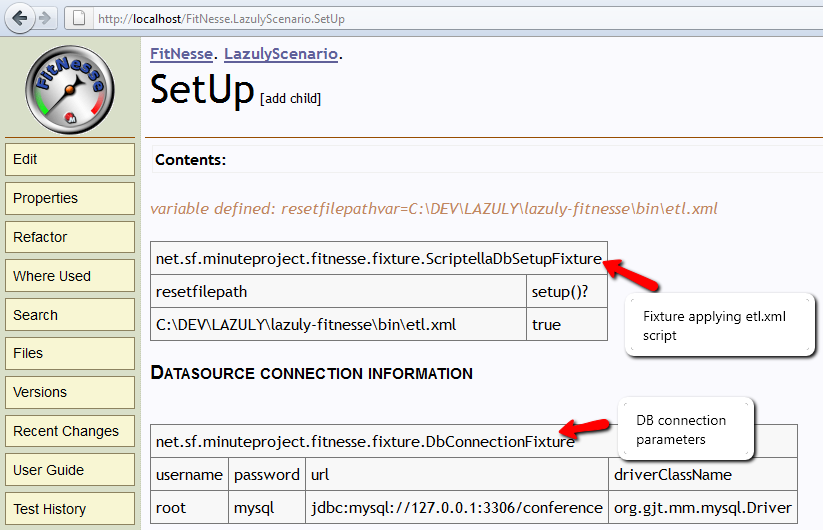
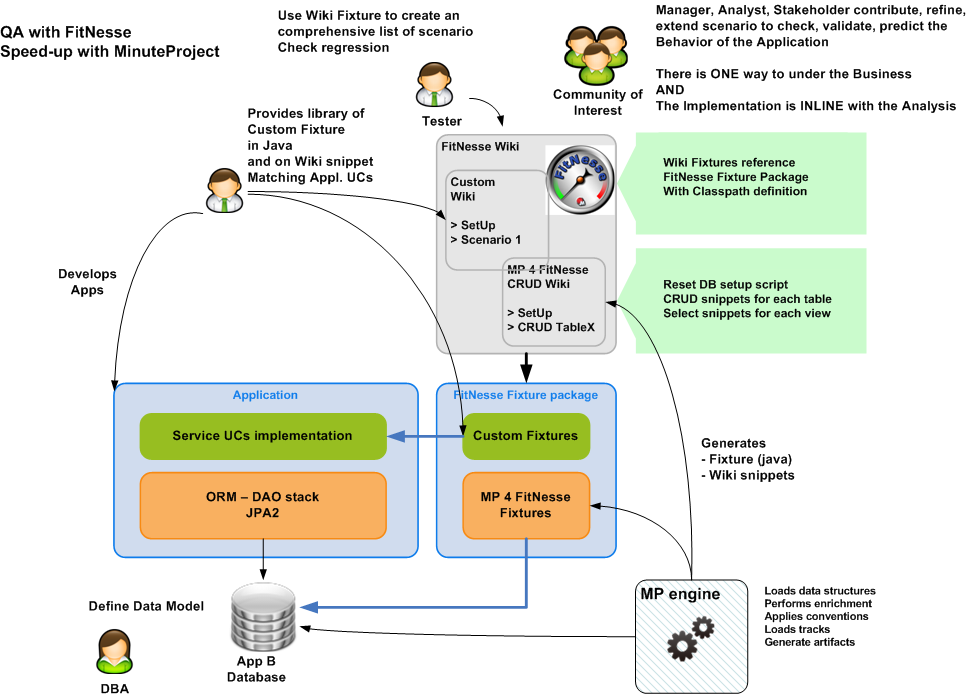
FitNessize you development: Adding the following snippet into the 'targets' node of the main configuration will generate an entire Fitnesse wiki ready to use for your acceptance testing.
   <target refname="FitNesse"
      name="default"
      fileName="mp-template-config-fitnesse.xml"
      outputdir-root="../../dev/liferay/output/FITNESSE"
      templatedir-root="../../template/framework/fitnesse">
   </target>
For more information see this articleExtend you model
Enrich you model with:
- views
- store procedure
- constraints
Conclusions
This article shows how to set reverse-engineering approach as a fast development methodology.
It is far less intrusive and restricted than Domain Driven Development and much faster.
This article also insists on how to apply your own conventions via 'declarative conventions'.
Minuteproject unleashes your productivity!
Things and tedious tasks that where bound to stay for the lifetime of your project can be removed.
At this point it takes more time for a DBA to write and execute an alter statement than to have full backend synchronisation!
Now you can move agile on your backend development.
It is far less intrusive and restricted than Domain Driven Development and much faster.
This article also insists on how to apply your own conventions via 'declarative conventions'.
Minuteproject unleashes your productivity!
Things and tedious tasks that where bound to stay for the lifetime of your project can be removed.
At this point it takes more time for a DBA to write and execute an alter statement than to have full backend synchronisation!
Now you can move agile on your backend development.
Conclusion for the LifeRay Dev team:
Altering
your backend might be quite long if you want to go to JPA2 track
described above. Meanwhile you can use MinuteProject without any
intrusivity on other tracks.
MinuteProject FitNesse fixture generated for Liferay and this really help increasing QA!
MinuteProject FitNesse fixture generated for Liferay and this really help increasing QA!
Try other MinuteProject tracks: for example any DB query can be RESTified (fully REST app generated) within seconds...
More information
More information about Minuteproject 4 JPA2 track can be found here.
More information
More information about Minuteproject 4 JPA2 track can be found here.