Showing posts with label openxava. Show all posts

Monday, January 6, 2014

how-to cloudbees minuteproject 4 openxava

Minuteproject releases a demo Openxava application to be hosted on cloudbees at http://petshopox.minuteproject.cloudbees.net/

Following those steps, you can recreate an Openxava application with minuteproject and host it on cloudbees.
All those steps are IDE-free (i.e. productivity oriented) all is done by command line!
This is a requirement for automation, since it is very easy to integrate with a CI tool such as Jenkins.
Meanwhile the code is compatible with Eclipse (for java), Mysql Workbench (for DB design + release) and Cloudbees website for manual release.

Principles

Generate an openxava application with minuteproject base on an DB structure.
The database use here is petshop; for the generation the database can be local or already hosted on cloudbees PaaS. At running the database is the one of the cloudbees PaaS.

The generated Openxava compliant artifacts are built into an Openxava application.
The application is to be deployed on a tomcat server.
The application relies on a JNDI Datasource on the tomcat server.

After setting the database on cloudbees and the connection pool cloudbees tomcat server, the application can be deployed.

Ingredients

Infrastructure

JDK 1.6+
Minuteproject last version
Openxava 4.9
Mysql DB
Tomcat
Cloudbees

  • sdk
  • account

Set up Cloudbees

Database

Create a mysql db schema on cloudbees
bees db:create petshopDB
   
Retrieve the DB info (connection info: server, port, user...) all you need to create you connection pool

bees app:info -db petshopDB 


Application

Create application

bees app:create -petshopox
     

Datasource

This is use get the alias use in the persistence.xml datasource (java:comp/env/jdbc/petshopDS)

bees app:bind -db petshopDB -a petshopox -as petshopDS 


Database setup

Run you database script from the information receive via $bees db:info -db petshopDB

Sample
mysql --host=ec2-50-19-213-178.compute-1.amazonaws.com --user=xxxx --password=xxxx --port=3306 xxx < petshop.sql
petshop-mysql.sql can be found in MP_HOME/sample/schema/

Generation

Full details at http://minuteproject.wikispaces.com/OpenXava
The generation is done by Minuteproject.
Minuteproject generation by command line comes by passing a configuration file name to model-generation.

Sample
model-generation petshop.xml

Sample petshop.xml configuration
<!DOCTYPE root>
<generator-config xmlns="http://minuteproject.sf.net/xsd/mp-config"
	xmlns:xs="http://www.w3.org/2001/XMLSchema-instance"
	xs:noNamespaceSchemaLocation="mp-config.xsd">
	<!-- adapted for cloudbees petshop model -->
	<configuration>
		<conventions>
			<target-convention type="enable-updatable-code-feature" />
		</conventions>
		<model name="petshop" version="1.0" package-root="net.sf.mp.demo">
			<data-model>
				<driver name="mysql" version="5.1.16" groupId="mysql"
					artifactId="mysql-connector-java"></driver>
				<dataSource>
					<driverClassName>org.gjt.mm.mysql.Driver</driverClassName>
					<url>jdbc:mysql://localhost:3306/petshop</url>
					<username>root</username>
					<password>mysql</password>
				</dataSource>
				<primaryKeyPolicy oneGlobal="false">
					<primaryKeyPolicyPattern name="autoincrementPattern"></primaryKeyPolicyPattern>
				</primaryKeyPolicy>
			</data-model>
			<business-model>
				<generation-condition>
					<condition type="exclude" startsWith="DUAL"></condition>
					<condition type="exclude" startsWith="ID_GEN"></condition>
					<condition type="exclude" startsWith="SEQUENCE"></condition>
				</generation-condition>
				<business-package default="pet">
					<condition type="package" startsWith="PRODUCT" result="product"></condition>
					<condition type="package" startsWith="ITEM" result="product"></condition>
				</business-package>
				<enrichment>
					<conventions>
						<entity-naming-convention type="apply-strip-table-name-prefix"
							pattern-to-strip="SYS,FIN" />
						<reference-naming-convention
							type="apply-referenced-alias-when-no-ambiguity" is-to-plurialize="true"></reference-naming-convention>
					</conventions>
					<package name="product">
						<entity-group entities="PRODUCT"></entity-group>
						<entity-group entities="ITEM"></entity-group>
					</package>
					<entity name="PRODUCT" alias="MY_GOOD_PRODUCT">
					</entity>
					<entity name="ITEM" alias="MY_GOOD_ITEM" comment="my item table">
						<field name="PRODUCTID" alias="THIS_IS_MY_PRODUCT" comment="my product field reference"></field>
					</entity>
					<entity name="CATEGORY" content-type="reference-data">
						<field name="DESCRIPTION" ordering="asc" label="my description"
							is-searchable="true"></field>
						<field name="NAME" ordering="asc"></field>
					</entity>
					<entity name="TAG" content-type="reference-data">
						<field name="TAG" ordering="asc">
							<semantic-reference>
								<sql-path path="NAME" />
							</semantic-reference>
						</field>
					</entity>
				</enrichment>
			</business-model>
			<statement-model>
				<enrichment>
					<conventions>
						<sdd-dummy-primarykey-convention add="true" />
					</conventions>
				</enrichment>
				<queries>
					<query name="get address abstract" id="dashAddress" type="dashboard"
						category="pie-chart">
						<query-body> <!-- dimensions column first -->
							<value>
<![CDATA[select city, count(*) as nb from address group by city order by count(*) desc limit ?]]>
                            </value>
						</query-body>
						<query-params>
							<query-param name="top city" is-mandatory="false"
								type="INT" sample="37" default="10"></query-param>
						</query-params>
					</query>
					<query name="get address summary" id="dashCity" type="dashboard"
						category="bar-chart">
						<query-body> <!-- dimensions column first -->
							<value>
<![CDATA[select city, count(*) as nb, count(*) as nb2 from address group by city order by count(*) desc]]>
                            </value>
						</query-body>
					</query>
					<query name="get addresses by criteria" id="c">
						<query-body>
							<value>
<![CDATA[select * from address where lcase(city) like ?]]>
                            </value>
						</query-body>
						<query-params>
							<query-param name="city" type="STRING" sample="'S'"
								convert="lowercase,append%" default="%">
							</query-param>
						</query-params>
					</query>
				</queries>
			</statement-model>
		</model>
		<targets catalog-entry="OpenXava" >
			<property name="environment" value="remote"></property>
			<property name="cloud-platform" value="cloudbees"></property>
			<property name="embed-driver" value="true"></property>
		</targets>
	</configuration>
</generator-config>

Appart from the 'classical' enrichment facilities, the interesting point are the properties under the targets node:
name="environment" value="remote" 
Implies to use a connection pool (for persistence.xml)
name="cloud-platform" value="cloudbees" 
Performs additional build facilities for Openxava on cloudbees
The OX war has to hold jta.jar, ejb.jar, mysql driver jar.
  • jta.jar and ejb.jar are embedded in tomcat/lib on the OX delivery.
name="embed-driver" value="true" 

  • mysql driver jar is shipped on MP delivery

  • Remark: the last 2 options are available on Minuteproject 0.8.6

    Build

    On the generated directory
    set/export OX_HOME
    set/export MP_HOME
    Run

    build-petshop.cmd/sh

    The application petshop.war goes into OX_HOME/workspace/petshop.dist

    The application is ready to be deployed on Cloudbees.

    Deploy

    bees app:deploy -a petshopox -t tomcat7 -Rjava_version=1.7 petshop.war

    petshopox is the name of the application on cloudbees

    Enjoy

    Friday, September 20, 2013

    nested SDD

    SDD (Statement driven development) is a powerfull productivity weapon.

    Until now minuteproject SDD configuration was limited to a single statement.
    This is enough when you want to query to display a list or graph or even call a store proc.

    But often your business need is make of nested action. The output of some query serves as the input for other actions.
    This is this capacity to handle multiple successive actions based on statement that is called nested SDD.

    Something concrete


    Imagine the following scenario
    I have DB connections that are stucked and I want to kill them. How I want to do that is via a web application.
    And I want to have this application without writing a single LOC and within 1 minute...
    Here is the kind of productivity challenge Minuteproject is bound to solve with nested SDD.

    Decomposition of the scenario

    Infrastructure

    Oracle DB.

    Queries

    I have DB connections that are stucked and I want to kill them.
    http://appsdbanew.wordpress.com/2007/11/05/how-to-find-blocking-session-and-kill-the-session-from-database/
    It can be reduced in writing 2 queries:

    Retrieve the connections (and stucked ones)
    select process,sid, serial#, blocking_session from v$session where blocking_session is not null
    

    Kill collections
    alter system kill session '#SID,#SERIAL' immediate

    Nesting

    The output of the first query (sid and serial#) serves as input of the second.


    Minuteproject

    Those two queries show be enough to get a application in Primefaces for quite handy for the help desked.


    Wednesday, August 28, 2013

    working with updatable code in mp4ox

    Minuteproject promotes updatable code as one integration technic.
    What it means is that you can change the generated code AND your modifications will be kept if you generate again (ex when your model change).

    So this as the interesting effect, that minuteproject is not only for bootstrap time (the early age of your project) BUT throughout the lifecycle of your project.

    Things change: code and model but it's OK you can still keep the power of reverse-engineering without losing your code.

    Concretely, what does it mean when working with Minuteproject 4 Openxava?


    The early age of your project - bootstrap time

    Model

    You have a idea, model it! the DB way (do not lose the power of your RDBMS)!
    • smart reverse-engineering (your model value more that just storing information, hunt the hidden concepts, enrich it!)
    • virtualization (use views as alternate models or graphs of views)
    • SDD (jdbc statements are sometimes enough)
    • Transient definition (DTO are welcome back for any purpose UC linked or not or partially to some persisted entities)

    Generation

    By default when you pick-up the target with catalog-entry="OpenXava" the resulting code will go to ../output//OpenXava

    Create your OpenXava project and test your idea

    If you open a prompt on your generated code directory and set/export your 2 environment variables MP_HOME and OX_HOME then you can call build-.
    This will create an OX project; build it, deploy it and open your browser to a menu to access your model.

    This is fine and described to create OX project.

    Maturity age

    Now your OpenXava project is up and running, you can extend your model, and sometimes you want to alter the generated code

    Enabling updatable code

    Enable your minuteproject to work and merge updated code.
    You have to add
    <generator-config>
    	<configuration>
            <conventions>
                <target-convention type="enable-updatable-code-feature" />
            </conventions>
    

    Working with updatable code

    You can check your OX classes and xml, they contain comments.
    Some comments are for extension MP-MANAGED-ADDED-AREA-BEGINNING
    Some comments are for modification MP-MANAGED-UPDATABLE-BEGINNING-DISABLE to change to MP-MANAGED-UPDATABLE-BEGINNING-ENABLE when modifying the area.
    If your artifact (java class, xml file) is final and you do not want to generate it again add MP-MANAGED-STOP-GENERATING

    3 possibilities to alter your code are discribed here


    Now you just have point Minuteproject 4 Openxava generation towards you Openxava workspace project.

    Add the outputdir-root of the node targets and set the directory of your Openxava workspace project

    And that's it!

    Conclusion

    This feature allows you to goes for continuous generation and continuous modification.
    Both approach are not longer exclusive BUT complementary.
    You got a development methodology to use the power of both approach:

    Tuesday, August 27, 2013

    Transient definition as a productivity weapon 4 Openxava


    Under construction (need 0.8.5 for generation) but can be used in the meantime as a OX tutorial to work with DTO


    Productivity challenge

    Alongside with (1) smart reverse-engineering, (2) virtualization, (3) Statement-driven-development, Transient definition is a productivity tool and technic that fasten your development.

    This article presents you transient definition and how it will help developing ad-hoc UCs in the case of Openxava. Ad-hoc means that there is no direct binding necessary between your screen info and your database entities.


    Transient definition

    Your model persistence is not enough to define all your data or you want to model the data differently than in the current model perspective. In short you have a UC that is not purely data centric?


    Mission statement

    UC general statement

    You know the Input of a UC and a function to be performed.
    The input does not have to match to field or entities in your DB. It may but it is not a requirement.
    You want:
    • Input screen
    • Validation/affectation UC
    • Stub to actions
    • Partial or empty implementation of the function
    • to be able to change your requirement and your implementation without losing your modifications 

    Concrete UC


    Model description

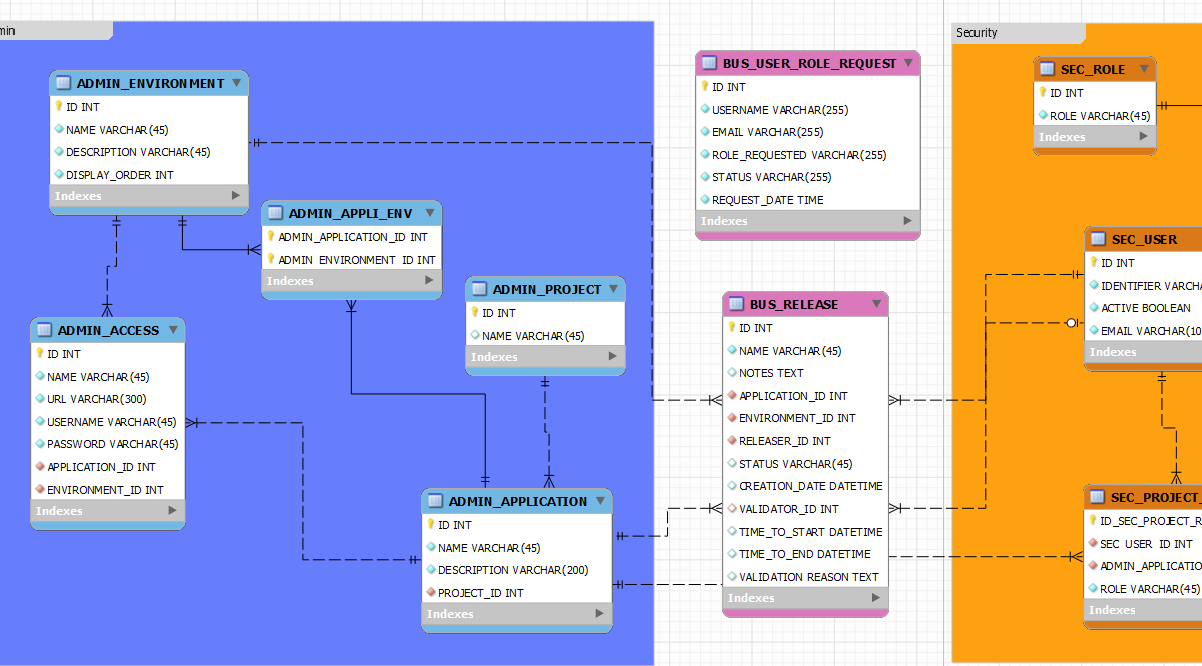
    You have a model that store Release information of an application.
    The release is linked to an application and environment.
    It has a releaser (the person issuing the release) and a validator (validating the release).
    Release status can be ACTIVE, DONE, REJECTED.
    A creation date is automatically created when inserting a release.

    UC description

    Provide releaser user access to create a release
    He can:

    • enter name, notes, time to start, time to end the release.
    • pick-up application and environment, releaser (a bit redundant it should be granted implicitly but it need a security wrapping to guess the id of the releaser - which is not part of this demo)
    • enter notification email (that is not persisted)


    By clicking a release button

    • Status will be set to ACTIVE
    • Creation date populated by current date
    • Store persistence data.
    Extend
    • input field notify available for any manipulation the user want (send mail for example) 


    Provide validator user access to view all the releases, select one fill extra info and validate or reject it.
    He can view the release


    Openxava Code

    Create Release

    @Entity (name="CreateRelease")
    @Table (name="bus_release")
    @Views({
    //MP-MANAGED-UPDATABLE-BEGINNING-DISABLE @view-base-bus_release@
     @View(
      name="base",
      members=
            ""  
            + "name  ; "
            + "notes  ; "
            + "timeToStart  ; "
            + "timeToEnd  ; "
            + "application  ; "
            + "environment  ; "
            + "releaser  ; "
            + "notify  ; "
      )
        )
    })
    
    public class CreateRelease {
    
        @Hidden  @Id @Column(name="ID" )
        @GeneratedValue(strategy = GenerationType.AUTO)
        private Integer id; 
    
        @Column(name="NAME",  length=45, nullable=false,  unique=false)
        @Required
        private String name;
    
        @Column(name="NOTES",    nullable=true,  unique=false)
        @Stereotype ("HTML_TEXT")
        private String notes;
    
        @Column(name="STATUS",  length=45,  nullable=true,  unique=false)
        private String status;
    
        @Column(name="CREATION_DATE",    nullable=true,  unique=false)
        @Temporal(TemporalType.TIMESTAMP)
        @ReadOnly(forViews="base,Create,Update,DEFAULT,createReleaseDEFAULT_VIEW")
        private java.util.Date creationDate;
    
        @Column(name="TIME_TO_START",    nullable=true,  unique=false)
        @Temporal(TemporalType.TIMESTAMP)
        private java.util.Date timeToStart;
    
        @Column(name="TIME_TO_END",    nullable=true,  unique=false)
        @Temporal(TemporalType.TIMESTAMP)
        private java.util.Date timeToEnd;
    
     @Transient
        private String validationReason;
    
     @Transient
        @Required
        @Stereotype ("EMAIL")
        private String notify;
    
        @ManyToOne (fetch=FetchType.LAZY ) 
        @JoinColumn(name="application_id", referencedColumnName = "ID",  nullable=true,  unique=false  )
        @ReferenceView ("reference") 
        private Application application;
        
        @ManyToOne (fetch=FetchType.LAZY ) 
        @JoinColumn(name="environment_id", referencedColumnName = "ID",  nullable=true,  unique=false  )
        @ReferenceView ("reference") 
        @DescriptionsList(
           descriptionProperties=
           "name "
           ,order=
           "displayOrder ASC "
    //       "name asc // "
        )
        @NoCreate
        @NoModify  
        private Environment environment;
        
    
        @ManyToOne (fetch=FetchType.LAZY ) //remove optional=false to aggragate but leads to a side effect when going directly to the entity: required check is not performed=> if no set DB check constraint is raised...
        @JoinColumn(name="releaser_id", referencedColumnName = "ID",  nullable=true,  unique=false  )
        @ReferenceView ("reference") 
        private User releaser;
     
     ...
     
    }
    
    Standard OX entity - mapping
    Contains transient field, stereotype and validation

    Release Action

    public class ReleaseAction extends ViewBaseAction {
    
     public void execute() throws Exception {
    //MP-MANAGED-UPDATABLE-BEGINNING-DISABLE @execute-porphyry@
            //super.execute();
            //TODO
            Messages errors =
                MapFacade.validate("CreateRelease", getView().getValues());
            if (errors.contains()) throw new ValidationException(errors);
            EntityManager em = XPersistence.getManager();
            try {
             CreateRelease e = new CreateRelease();
             if (errors.contains()) throw new ValidationException(errors);
       // set init condition 
       // copy field from form
          e.setName((String)getView().getValue("name"));
          e.setNotes((String)getView().getValue("notes"));
          e.setTimeToStart((Date)getView().getValue("timeToStart"));
          e.setTimeToEnd((Date)getView().getValue("timeToEnd"));
          e.setNotify((String)getView().getValue("notify"));
             // parent
    
                Map applicationMap = (Map)getView().getValue("application");
                if (applicationMap!=null) {
                    Integer applicationId = (Integer)applicationMap.get("id");
                    if (applicationId != null) {
            Application application = new Application();
               application.setId(applicationId);
                  e.setApplication(application);
                 }
                }
    
                Map environmentMap = (Map)getView().getValue("environment");
                if (environmentMap!=null) {
                    Integer environmentId = (Integer)environmentMap.get("id");
                    if (environmentId != null) {
            Environment environment = new Environment();
               environment.setId(environmentId);
                  e.setEnvironment(environment);
                 }
                }
    
                Map releaserMap = (Map)getView().getValue("releaser");
                if (releaserMap!=null) {
                    Integer releaserId = (Integer)releaserMap.get("id");
                    if (releaserId != null) {
            User releaser = new User();
               releaser.setId(releaserId);
                  e.setReleaser(releaser);
                 }
                }
       // assign field
          e.setStatus(new String("ACTIVE"));
       XPersistence.getManager().persist(e); 
       getView().reset();
       resetDescriptionsCache();
            } catch (Exception e) {
                errors = new Messages();
                errors.add(e.getMessage());
                throw new ValidationException(errors);
            }
            //TODO return list
            addInfo("call ReleaseAction done!");
    //MP-MANAGED-UPDATABLE-ENDING
    
     }
    }
    

    • Extends ViewBaseAction
    • Performs validation
    • Retrieves fields and object from getView()
    • Adds status value to ACTIVE
    • Stores value via XPersistence API

    Validate release

    @Entity (name="ValidateRelease")
    @Table (name="bus_release")
    @Views({
    //MP-MANAGED-UPDATABLE-BEGINNING-DISABLE @view-base-bus_release@
     @View(
      name="base",
      members=
            ""  
            + "name  ; "
            + "notes  ; "
            + "status  ; "
            + "creationDate  ; "
            + "timeToStart  ; "
            + "timeToEnd  ; "
            + "application  ; "
            + "environment  ; "
            + "releaser  ; "
            + "validator  ; "
            + "validationReason  ; "
            + "inform  ; "
      ),
      ...
    })
    
    @Tabs({
    @Tab(
    properties=
         " name "
        +",  notes "
        +",  status "
        +",  creationDate "
        +",  timeToStart "
        +",  timeToEnd "
        +",  environment.name "
        +",  releaser.identifier "
        +",  validator.identifier "
    )
    ...
    })
    
    public class ValidateRelease {
    
        @Hidden  @Id @Column(name="ID" )
        @GeneratedValue(strategy = GenerationType.AUTO)
        private Integer id; 
    
        @Column(name="NAME",  length=45, nullable=false,  unique=false)
        @Required
     @ReadOnly
        private String name;
    
        @Column(name="NOTES",    nullable=true,  unique=false)
        @Stereotype ("HTML_TEXT")
     @ReadOnly
        private String notes;
    
        @Column(name="STATUS",  length=45,  nullable=true,  unique=false)
     @ReadOnly
        private String status;
    
        @Column(name="CREATION_DATE",    nullable=true,  unique=false)
        @Temporal(TemporalType.TIMESTAMP)
        @ReadOnly(forViews="base,Create,Update,DEFAULT,validateReleaseDEFAULT_VIEW")
        private java.util.Date creationDate;
    
        @Column(name="TIME_TO_START",    nullable=true,  unique=false)
        @Temporal(TemporalType.TIMESTAMP)
     @ReadOnly
        private java.util.Date timeToStart;
    
        @Column(name="TIME_TO_END",    nullable=true,  unique=false)
        @Temporal(TemporalType.TIMESTAMP)
     @ReadOnly
        private java.util.Date timeToEnd;
    
     @Transient
        private String validationReason;
    
     @Transient
        @Required
        @Stereotype ("EMAIL")
        private String inform;
    
        @ManyToOne (fetch=FetchType.LAZY ) 
        @JoinColumn(name="application_id", referencedColumnName = "ID",  nullable=true,  unique=false  )
        @ReferenceView ("reference") 
        @NoCreate
        @NoModify  
        private Application application;
        
        @ManyToOne (fetch=FetchType.LAZY ) 
        @JoinColumn(name="environment_id", referencedColumnName = "ID",  nullable=true,  unique=false  )
        @ReferenceView ("reference") 
        @DescriptionsList(
           descriptionProperties=
           "name "
           ,order=
           "displayOrder ASC "
    //       "name asc // "
        )
        @NoCreate
        @NoModify  
        private Environment environment;
        
        @ManyToOne (fetch=FetchType.LAZY ) 
        @JoinColumn(name="releaser_id", referencedColumnName = "ID",  nullable=true,  unique=false  )
        @ReferenceView ("reference") 
        @NoCreate
        @NoModify  
        private User releaser;
    
        @ManyToOne (fetch=FetchType.LAZY ) 
        @JoinColumn(name="validator_id", referencedColumnName = "ID",  nullable=true,  unique=false  )
        @ReferenceView ("reference") 
        private User validator;
        
    
    }


    Validate Action

    public class ValidateAction extends ViewBaseAction {
    
     public void execute() throws Exception {
    //MP-MANAGED-UPDATABLE-BEGINNING-DISABLE @execute-porphyry@
            //super.execute();
            //TODO
            Messages errors =
                MapFacade.validate("ValidateRelease", getView().getValues());
            if (errors.contains()) throw new ValidationException(errors);
            EntityManager em = XPersistence.getManager();
            try {
             ValidateRelease e = new ValidateRelease();
       e.setId(Integer.valueOf(getView().getValueString("id")));
       e = XPersistence.getManager().find(ValidateRelease.class, e.getId());
                //check display condition
          if (!new String("ACTIVE").equals(e.getStatus()))
        errors.add ("Condition statusActive not met!");
             if (errors.contains()) throw new ValidationException(errors);
       // set init condition 
       // copy field from form
          e.setValidationReason((String)getView().getValue("validationReason"));
          e.setInform((String)getView().getValue("inform"));
             // parent
    
                Map validatorMap = (Map)getView().getValue("validator");
                if (validatorMap!=null) {
                    Integer validatorId = (Integer)validatorMap.get("id");
                    if (validatorId != null) {
            User validator = new User();
               validator.setId(validatorId);
                  e.setValidator(validator);
                 }
                }
       // assign field
          e.setStatus(new String("DONE"));
       XPersistence.getManager().persist(e); 
       getView().reset();
       resetDescriptionsCache();
            } catch (Exception e) {
                errors = new Messages();
                errors.add(e.getMessage());
                throw new ValidationException(errors);
            }
            //TODO return list
            addInfo("call ValidateAction done!");
    //MP-MANAGED-UPDATABLE-ENDING
    
     }


    • Implement little business logic
    • Stores value
    • Updates view display info

    Application

    <application name="porphyry"> 
     <!-- transfer entities -->
     <module name="CreateRelease" >
         <model name="CreateRelease"/>
         <view name="base"/> 
         <controller name="CreateReleaseController"/>
         <mode-controller name="DetailOnly"/>
     </module>
     <module name="ValidateRelease" >
         <model name="ValidateRelease"/>
         <view name="base"/> 
         <controller name="ValidateReleaseController"/>
         <mode-controller name="SplitOnly"/>
     </module>
     ...
    
    CreateRelease is DetailOnly while ValidateRelease is SplitOnly mode (list+detail)

    Controllers

    <controllers> 
        <!-- transfer entities -->
      <!-- bus_release -->
     <controller name="CreateReleaseController">
      <action name="release" mode="detail" class="net.sf.mp.demo.porphyry.action.business.busrelease.ReleaseAction" >
       <use-object name="xava_view" />
      </action>     
     </controller>
      <!-- bus_release -->
     <controller name="ValidateReleaseController">
      <action name="validate" mode="detail" class="net.sf.mp.demo.porphyry.action.business.busrelease.ValidateAction" >
       <use-object name="xava_view" />
      </action>     
      <action name="reject" mode="detail" class="net.sf.mp.demo.porphyry.action.business.busrelease.RejectAction" >
       <use-object name="xava_view" />
      </action>     
     </controller>
    

    CreateReleaseController has one action 'Create' while ValidateReleaseController has 2 validate/reject

    Minuteproject Configuration

    Minuteproject abstract this effort by providing tooling to the analyst to describe those screens and actions that ultimately and implicitly become a flow.

    <enrichment>
     <!-- transient objects -->
     <entity name="create release" is-transfer-entity="true" is-searchable="false"
      main-entity="bus_release">
      <field name="id" hidden="true"></field>
      <field name="name"></field>
      <field name="notes"></field>
      <field name="application_id"></field>
      <field name="environment_id"></field>
      <field name="releaser_id" ></field>
      <field name="status" value="ACTIVE" hidden="true"></field>
      <field name="creation_date" hidden="true"></field>
      <!-- <field name="validator_id"></field>  -->
      <field name="time_to_start"></field>
      <field name="time_to_end"></field>
      <field name="validation_reason" hidden="true"></field>
      <!-- other fields -->
      <field name="notify" type="string" mandatory="true">
       <stereotype stereotype="EMAIL" />
      </field>
      <actions>
       <action name="release" default-implementation="insert" >
        <field name="status" value="ACTIVE"></field>
       </action>
      </actions>
     </entity>
     <!-- transient objects -->
     <entity name="validate release" is-transfer-entity="true"
      main-entity="bus_release" is-editable="false" is-searchable="true">
      <field name="id" hidden="true"></field>
      <field name="name"></field>
      <field name="notes"></field>
      <field name="application_id"></field>
      <field name="environment_id"></field>
      <field name="releaser_id"></field>
      <field name="status"></field>
      <field name="creation_date"></field>
      <field name="validator_id" is-editable="true"/><!-- default-value="profile.user.id"></field> -->
      <field name="time_to_start"></field>
      <field name="time_to_end"></field>
      <field name="validation_reason" is-editable="true"></field>
      <!-- other fields -->
      <field name="inform" type="string" mandatory="true"
       is-editable="true">
       <stereotype stereotype="EMAIL" />
      </field>
      <actions>
       <action name="validate" default-implementation="update">
        <action-condition name="statusActive">
         <field name="status" value="ACTIVE"/>
        </action-condition>
        <field name="status" value="DONE"></field>
       </action>
       <action name="reject" default-implementation="update">
        <action-condition name="statusActive">
         <field name="status" value="ACTIVE"/>
        </action-condition>
        <field name="status" value="REJECT"></field>
       </action>      
      </actions>
     </entity>
    </enrichment>
    

    Screens

    Create release


    Validation


    Releasing


    Validator view


    Select one entry


    Validate


    Try to reprocess a status-DONE-release


    Conclusion

    Minuteproject provides transient definition facilities & generation capabilities.

    Although the screens and actions are not very complex, minuteproject can induce a flow, and without a workflow engine!

    Minuteproject is also generating portlet.xml in order to deploy 'Transient-definition portlet' on portal such as Liferay.

    Friday, August 23, 2013

    SDD as a productivity weapon 4 openxava

    Under construction (need 0.8.5 for generation) but can be used in the meantime as a OX tutorial to work with any jdbc sql statement (here stored-procedure)

    Productivity challenge

    With SDD (Statement driven development) what is important is I/O and functionality.
    The model is secondary.
    To experience it, let's have a store procedure that perform a required operation and get a web application out of it with Minuteproject 4 Openxava.

    Mission statement

    UC general statement

    You have information to pass to a DB via a web application to perform a function.
    You would like the input to be validated base on type, presence, stereotype, membership.

    UC specific

    You need a functionality to ask for role in the application.
    As input you pass 3 params:
    • username
    • email
    • requested role
     UserName is:
    • mandatory
    • string
    Email is:
    • mandatory
    • stereotype (format)
     Request role is:
    • mandatory
    • should be one of the application specific role

    The function shall also:
    • register the time of creation
    • status=TO_TREAT
    The function is provided in format of a stored procedure.

    Dev environment constraints

    A schema containing
    • a table SEC_ROLE containing roles
    • a table BUS_USER_ROLE_REQUEST
    • a store procedure ASK_FOR_ROLE
    • CREATE PROCEDURE ask_for_role(
        IN username VARCHAR(255),
        IN email VARCHAR(255),
         IN role VARCHAR(255)
      )
      BEGIN
      Insert into BUS_USER_ROLE_REQUEST (USERNAME, EMAIL, ROLE_REQUESTED, STATUS, REQUEST_DATE)
      values (username, email, role, 'TO_TREAT', NOW());
      
      END
      
    • SEC_ROLE and  BUS_USER_ROLE_REQUEST are not linked by any relationships (no FK nor m2m).

    Configuration

    This configuration focus on the SDD part
    <!DOCTYPE root>
    <generator-config>
     <configuration>
            <conventions>
                <target-convention type="enable-updatable-code-feature" />
            </conventions>
    
    <!-- other configuration, data-model where sec_role and bus_user_role_request are present... -->
    
      <model name="porphyry" version="1.0" package-root="net.sf.mp.demo">
       <statement-model>
        <queries>
                <query name="ask_for_role" id="ask_for_role" >
                             <query-body>
                             <value>
    <![CDATA[call ask_for_role (?,?,?)]]>
                                </value>
                             </query-body>
                             <query-params>
                                 <query-param name="username" is-mandatory="true" type="string" sample="'a'" is-id="true"></query-param>
                                 <query-param name="email" is-mandatory="true" type="string" sample="'b'">
                                  <stereotype stereotype="EMAIL" />
                                 </query-param>
                                 <query-param name="role" is-mandatory="true" type="string" sample="'c'">
                                    <query-param-link entity-name="sec_role" field-name="role"/>
                                 </query-param>
                             </query-params>
                         </query>
                    </queries>
                </statement-model>
             </model>
      <targets catalog-entry="OpenXava" >
      </targets>
     </configuration>
    </generator-config> 
    The main points are:
    • call ask_for_role with 3 parameters
    • description of the parameters (name, type, presence, stereotype)
    • restrict to a set of value coming from a table and field (query-param-link)

    Openxava design flow

    The input is in format of an Openxava/JPA2 entity to enable binding and link to other entity.
    But this entity will never be persisted and never lookup.
    The input screen will be accessed directly, and button match the action. After the action is performed a message is display.
    To enable this flow OX controllers.xml and application.xml nodes are generated.
    The action binding the input data from the form; validating and calling the store procedure call are also generated.

    Generated code

    Input/Output bean generated


    import javax.persistence.*;
    import org.openxava.annotations.*;
    
    import net.sf.mp.demo.porphyry.domain.security.Role;
    
    @Entity (name="AskForRoleIn")
    @Table (name="ask_for_role")
    @Views({
    //MP-MANAGED-UPDATABLE-BEGINNING-DISABLE @view-base-ask_for_role@
     @View(
      name="base",
      members=
            ""  
            + "username  ; "
            + "email  ; "
            + "role  ; "
      ),
    //MP-MANAGED-UPDATABLE-ENDING
     @View(
      name="Create", 
      extendsView="base"
     ),
     @View(
      name="Update", 
      extendsView="base",
            members=
              ""  
     ),
     @View(extendsView="base",
            members=
              ""  
     ),
        @View(name="askForRoleDEFAULT_VIEW", 
        members=
              " username ;"  
            + "email  ; "
            + "roleTransient  ; "
     ),
    //MP-MANAGED-UPDATABLE-BEGINNING-DISABLE @view-reference-ask_for_role@
        @View(name="reference", 
           extendsView="askForRoleDEFAULT_VIEW"
    //MP-MANAGED-UPDATABLE-ENDING
        )
    })
    
    //MP-MANAGED-ADDED-AREA-BEGINNING @class-annotation@
    //MP-MANAGED-ADDED-AREA-ENDING @class-annotation@
    public class AskForRoleIn {
    
         @Id @Column(name="username" ,length=255)
        private String username; 
    
    //MP-MANAGED-ADDED-AREA-BEGINNING @email-field-annotation@
    //MP-MANAGED-ADDED-AREA-ENDING @email-field-annotation@
    
    //MP-MANAGED-UPDATABLE-BEGINNING-DISABLE @ATTRIBUTE-email@
        @Column(name="email",  length=255, nullable=false,  unique=false)
        @Required
        @Stereotype ("EMAIL")
        private String email;
    //MP-MANAGED-UPDATABLE-ENDING
    
    //MP-MANAGED-ADDED-AREA-BEGINNING @role_TRANSIENT-field-annotation@
    //MP-MANAGED-ADDED-AREA-ENDING @role_TRANSIENT-field-annotation@
    
    //MP-MANAGED-UPDATABLE-BEGINNING-DISABLE @ATTRIBUTE-role_TRANSIENT@
     @Transient
     @ReadOnly
        private String roleTransient;
    //MP-MANAGED-UPDATABLE-ENDING
    
    
    //MP-MANAGED-UPDATABLE-BEGINNING-DISABLE @parent-Role-ask_for_role@
        @ManyToOne (fetch=FetchType.LAZY ,optional=false) 
        @JoinColumn(name="role", referencedColumnName = "ID", nullable=false,  unique=false  )
        @ReferenceView ("reference") 
        private Role role;
    
    ...
    } 
    Although not persisted and never looked up AskForRoleIn can be used by Openxava:
    •  to pass by information as a DTO
    • perform validation
    • perform assignment (it is linked to table Role)
    • it contains a transient field roleTransient that will be used by the Openxava action to copy the 'role' field of the 'role' table (not the pk)
    • offers a view with
      • simple input field
      • associated entities
    • @Id is associated to one field (otherwise JPA/Hibernate complains)

    Action


    /**
     * template reference : 
     * - name      : ActionOX.SDD.query
     * - file name : ActionOX.SDD.query.vm
     * - time      : 2013/08/22 AD at 12:29:41 CEST
    */
    package net.sf.mp.demo.porphyry.sdd.action.statement;
    
    //MP-MANAGED-ADDED-AREA-BEGINNING @import@
    //MP-MANAGED-ADDED-AREA-ENDING @import@
    
    import org.openxava.jpa.*;
    import org.openxava.model.*;
    import org.openxava.util.*;
    import org.openxava.validators.*;
    import org.openxava.actions.*;
    import java.util.*;
    
    import java.sql.Connection;
    import java.sql.PreparedStatement;
    import java.sql.ResultSet;
    
    import javax.persistence.EntityManager;
    import javax.persistence.PersistenceContext;
    import javax.persistence.Query;
    
    import org.hibernate.HibernateException;
    import org.hibernate.Session;
    
    import net.sf.mp.demo.porphyry.sdd.out.statement.AskForRoleOutList;
    import net.sf.mp.demo.porphyry.sdd.out.statement.AskForRoleOut;
    import net.sf.mp.demo.porphyry.sdd.in.statement.AskForRoleIn;
    
    public class AskForRoleAction extends ViewBaseAction {
    
        public static final String QUERY_NATIVE = "call ask_for_role (?,?,?)";
    
    //MP-MANAGED-UPDATABLE-BEGINNING-DISABLE @SDD_EXECUTE_GET-ask_for_role@
        public AskForRoleOutList execute (AskForRoleIn askForRoleIn) {
            AskForRoleOutList askForRoleOutList = new AskForRoleOutList();
            List list = executeJDBC (askForRoleIn);
            askForRoleOutList.setAskForRoleOuts (list);
            return askForRoleOutList;
        }
    //MP-MANAGED-UPDATABLE-ENDING
    
    //MP-MANAGED-UPDATABLE-BEGINNING-DISABLE @SDD_EXECUTE_JDBC-ask_for_role@
     public List<askforroleout> executeJDBC(AskForRoleIn askForRoleIn) {
      if (askForRoleIn==null)
       askForRoleIn = new AskForRoleIn();
      List<askforroleout> list = new ArrayList<askforroleout>();
      PreparedStatement pstmt = null;
      ResultSet rs = null;
      Connection conn = null;
      try {
       conn = getConnection();
       pstmt = conn.prepareStatement(QUERY_NATIVE);
                if (askForRoleIn.getUsername()==null) {
                   pstmt.setNull(1, java.sql.Types.VARCHAR);
                } else {
                   pstmt.setString(1, askForRoleIn.getUsername()); 
                }
                if (askForRoleIn.getEmail()==null) {
                   pstmt.setNull(2, java.sql.Types.VARCHAR);
                } else {
                   pstmt.setString(2, askForRoleIn.getEmail()); 
                }
                if (askForRoleIn.getRoleTransient()==null) {
                   pstmt.setNull(3, java.sql.Types.VARCHAR);
                } else {
                   pstmt.setString(3, askForRoleIn.getRoleTransient()); 
                }
       rs = pstmt.executeQuery();
      } catch (Exception e) {
            e.printStackTrace();
         } finally {
           try {
             rs.close();
             pstmt.close();
             conn.close();
           } catch (Exception e) {
             e.printStackTrace();
           }
         }
      return list;
     }
    //MP-MANAGED-UPDATABLE-ENDING
    
    //if JPA2 implementation is hibernate
        @SuppressWarnings("deprecation")   
        public Connection getConnection() throws HibernateException {  
            Session session = getSession();  
            Connection connection = session.connection();  
            return connection;  
        } 
        
        private Session getSession() {  
            Session session = (Session) XPersistence.getManager().getDelegate();  
            return session;  
        }
    
     public void execute() throws Exception {
    //MP-MANAGED-UPDATABLE-BEGINNING-DISABLE @execute-porphyry@
            //super.execute();
            //TODO
            Messages errors = 
                MapFacade.validate("AskForRoleIn", getView().getValues());
            if (errors.contains()) throw new ValidationException(errors);
            AskForRoleIn e = new AskForRoleIn();
     e.setUsername((String)getView().getValue("username"));
     e.setEmail((String)getView().getValue("email"));
    
     // parent to copy to transient field
            Map roleMap = (Map)getView().getValue("role");
            if (roleMap!=null) {
      e.setRoleTransient ((String)roleMap.get("role"));
            }
      
            try {
                execute(e);
            } catch (Exception ex) {
                errors = new Messages();
                errors.add(ex.getMessage());
                throw new ValidationException(errors);
            }
            //TODO return list
            addInfo("call AskForRoleAction done!");
    //MP-MANAGED-UPDATABLE-ENDING
    
     }
    
    //MP-MANAGED-ADDED-AREA-BEGINNING @implementation@
    //MP-MANAGED-ADDED-AREA-ENDING @implementation@
    
    } 
    • perform validation
    • retrieve simple type as well as complex (Role object type)
    • copy values a input of the store proc call
      • here the store proc does not return anything so there is no parsing of the resultset.
    Here one can argue that we do not need the transient field 'roleTransient' in AskForRoleIn.
    This is true. It is present because it was easier from a generation point of view to keep the parameter order of the stored procedure call.

    Controller.xml


    <controllers> 
        <!-- statement driven development SDD -->
      <!-- $table.name -->
     <controller name="AskForRoleController">
      <action name="askForRole" mode="detail" class="net.sf.mp.demo.porphyry.sdd.action.statement.AskForRoleAction" >
       <use-object name="xava_view" />
      </action>     
     </controller>
    </controllers> 
    
    Provides controller and action

    Application.xml


    <application name="porphyry"> 
    
        <!-- statement driven development SDD -->
     <module name="AskForRoleIn" >
         <model name="AskForRoleIn"/>
         <view name="base"/> 
         <controller name="AskForRoleController"/>
         <mode-controller name="DetailOnly"/>
     </module>
     
    </application>
    
    
    Wiring between Model/View/Controller and mode
    Detail mode selected (ie no lookup)

    Screens

    Input screen 

    Available at ${yourcontext}/xava/home.jsp?application=porphyry&module=AskForRoleIn
    Is also available as a menu entry under statement

     Sub select Use case


    Performing the action

    Viewing the result


    Since it is store in table USER_ROLE_REQUEST
    Minuteproject generates also a CRUD access on this table.
    By filtering we check that the input of the store proc+ additional business field are stored correctly.


    Conclusion

    Statement Driven Development - SDD
    • provides tooling for analyst
    • RAD for developer 
      • any sql statement could now be an advance business UC (sub affection, validation)
      • necessary OX gearing is generated.
    • is a pillar of development productivity
    Minuteproject is also generating portlet.xml in order to deploy 'Transient-definition portlet' on portal such as Liferay.


    Monday, August 19, 2013

    Northwind DB revisited with MP 4 OX

    Minuteproject (0.8.4) now supports ms-sqlserver.
    It has been tested with MS Northwind DB on sqlserver 2014.
    Here are the steps to follow to get an OpenXava application from the northwind DB.

    Goal:
    Get a working Northwind Openxava application in couple of seconds.
    For hungry minds please find the resulting code on googlecode.

    Northwind DB

    Northwind database is a sample DB provided by Microsoft.
    It can be found at http://northwinddatabase.codeplex.com/releases/view/71634

    The sql provided to create the schema has DB objects (tables/views) containing space.
    This sql has been revisited to remove those spaces a version can be found here.

    • Install SQLServer
    • Create an account
    • Run the script.

    MinuteProject with SQLSERVER

    Minuteproject
    • uses com.microsoft.sqlserver.jdbc.SQLServerDriver jdbc driver
    • associates 'identity' as a primary key strategy by default on the console
    • associates org.hibernate.dialect.SQLServer2008Dialect for hibernate dialect
    • proposes maven artifact-id=sqljdbc4; group-id=com.microsoft.sqlserver; version=4.0 for pom configuration
    Furthermore when retrieving the metadata of your model, set 'dbo' of the schema node.

    Minuteproject configuration


    <!DOCTYPE root>
    <generator-config>
     <configuration>
      <model name="nortewind" version="1.0" package-root="net.sf.mp.demo">
       <data-model>
        <driver name="sqlserver" version="4.0" groupId="com.microsoft.sqlserver"
         artifactId="sqljdbc4"></driver>
        <dataSource>
         <driverClassName>com.microsoft.sqlserver.jdbc.SQLServerDriver</driverClassName>
         <url>jdbc:sqlserver://localhost:1433;databaseName=northwind</url>
         <username>sqlserver</username>
         <password>xxxxxxxx</password>
        </dataSource>
        <!-- for Oracle and DB2 please set the schema <schema> </schema> -->
        <schema>dbo</schema>
        <primaryKeyPolicy oneGlobal="true">
         <primaryKeyPolicyPattern name="identityPattern"></primaryKeyPolicyPattern>
        </primaryKeyPolicy>
       </data-model>
       <business-model>
        <business-package default="business">
            <condition type="package" database-object-type="VIEW" result="review"></condition>   
        </business-package>
        <enrichment>
         <conventions>
              <view-primary-key-convention 
                type="apply-default-primary-key-otherwise-first-one" 
                default-primary-key-names="ID" /> 
             <column-naming-convention
           type="apply-fix-primary-key-column-name-when-no-ambiguity-and-not-natural"
           default-value="ID" />
             <entity-naming-convention type="apply-field-alias-based-on-camelcase"/>
             <column-naming-convention type="apply-field-alias-based-on-camelcase"/>
    
          <reference-naming-convention
           type="apply-referenced-alias-when-no-ambiguity" is-to-plurialize="false" />
          <reference-naming-convention type="apply-many-to-many-aliasing" is-to-plurialize="false"/>
         </conventions>
        </enrichment>
       </business-model>
    
      </model>
    <!-- -->    <targets catalog-entry="OpenXava">
      </targets>  
    <!--    <targets catalog-entry="JPA2" >
      </targets>   -->
     </configuration>
    </generator-config>


    This configuration will allow you to

    • retrieve sqlserver information for the model northwind (do not forget to specify 'dbo' in schema)
    • assign identity as primary key strategy
    • separate table package from view package. (tables go in package business, views in package review)
    • apply convention
      • use camel case for field and entity (table/view)
      • associate a primary key if not present. The primary key would then be attribute to the field ID if present otherwise the first found.
      • have clean name (here not plurialized because northwind already use plural in DB object name) when possible (i.e. there is no variable name collisition - this occurs when you have more than one relationship between two objects).
    • use the track OpenXava from the catalog.

    Steps

    Copy this configuration to /mywork/config as northwind-OX.xml 
    From a command line run model-generation.cmd/sh northwind-OX.xml 
    The result will go in /mywork/output/nortewind/OpenXava

    Open a prompt in /mywork/output/nortewind/OpenXava
    set OX_HOME and MP_HOME (where you install Openxava and Minuteproject)
    • set OX_HOME= path-to-Openxava // export OX_HOME in linux
    • set MP_HOME= path-to-Minuteproject // export MP_HOME in linux

    Run build-nortewind.cmd/sh

    This should be enough to get a

    Enjoy!

    Screenshots

    You have Openxava CRUD on all tables and selection on views

    Menu entries


    Select Order

     Region details
    List of products (view)

    MinuteProject with console

    The code can also be generated with Minuteproject console, it is faster since you do not have to write any configuration. Meanwhile it is more limited since not all the convention are available on the console.

    click /bin/start-console.sh/cmd
    apply the following parameters


    Click on generate and the output will go to /output/northwind/Openxava

    You can them process with the same steps as with the configuration.


    Conclusion

    Minuteproject 0.8.4 offers sqlserver generation and simplifies the configuration of the tracks.
    Feel free to pick up others by picking them from the drop down list or by changing the attribute catalog-entry of the node targets by one of the following value:

    JPA2
    JPA2-ABL
    BSLA-JPA2
    REST-JEE
    REST-SpringMVC
    REST-CXF-Spring
    REST-CXF-JEE
    WS-JEE
    JOOQ
    Primefaces-Spring
    Primefaces-JEE
    FitNesse
    Solr
    OpenXava
    Grails
    Play
    Vaadin
    Roo
    Maven Spring Hibernate
    Maven Spring JPA/Hibernate
    SpringService

    Remark some tracks are under construction.


    Wednesday, May 23, 2012

    RigaJUG - demo - instant OPENXAVA app

    From the following model called Tranxy

    we'll generate instantly an Openxava app.

    The interesting part of this demo is the enrichment of the model, it is described Riga demo 2 (The main complexity comes by having 2 tables (language and user) linked by 2 many-to-many).

    Actions

    There are four simple actions make it happened:
    • Drop TRANXY-OPENXAVA.xml in /mywork/config and run: model-generation.cmd/sh TRANXY-OPENXAVA.xml
    • In /output/OPENXAVA set the 2 environment variables
      • set OX_HOME=../openxava-4.4.1 (export on unix)
      • set MP_HOME=../minuteProject-0.8.1 (export on unix)
    • execute >build-tranxy.cmd/sh
    And that's it!
    Last action will 
    • create an Openxava project
    • build it (portlet included ready for Liferay)
    • start Openxava embedded tomcat server
    • add connection datasource
    • deploy the build application on tomcat
    • start a browser connection at  http://localhost:8080/tranxy/xava/homeMenu.jsp where the menu is.

    The application works on an empty database, you can use the Openxava-Minuteproject-generated-app to
    populate it...
    Enjoy!

    Prerequisits

    MinuteProject installed 
    Openxava installed 
    Ant installed
    Model Tranxy (script) installed on an up-and-running Mysql server
    Java 1.6

    Configuration

    TRANXY-OPENXAVA.xml
    <!DOCTYPE root>
    <generator-config xmlns="http://minuteproject.sf.net/xsd/mp-config" 
    xmlns:xs="http://www.w3.org/2001/XMLSchema-instance" 
    xs:noNamespaceSchemaLocation="../config/mp-config.xsd">
        <configuration>
            <conventions>
                <target-convention type="enable-updatable-code-feature" />
            </conventions>
            <model name="tranxy" version="1.0" package-root="net.sf.mp.demo">
                <data-model>
                    <driver name="mysql" version="5.1.16" groupId="mysql"
                        artifactId="mysql-connector-java"></driver>
                    <dataSource>
                        <driverClassName>org.gjt.mm.mysql.Driver</driverClassName>
                        <url>jdbc:mysql://127.0.0.1:3306/tranxy</url>
                        <username>root</username>
                        <password>mysql</password>
                    </dataSource>
                    <primaryKeyPolicy oneGlobal="false" >
                        <primaryKeyPolicyPattern name="autoincrementPattern"></primaryKeyPolicyPattern>
                    </primaryKeyPolicy>
                </data-model>
                <business-model>
                    <business-package default="tranxy">
                        <condition type="package" startsWith="trans" result="translation"></condition>
                    </business-package>
                <enrichment>
                 <conventions>
                  <!-- manipulate the structure and entities BEFORE manipulating the 
                   entities -->
                  <column-naming-convention type="apply-fix-primary-key-column-name-when-no-ambiguity" 
                          default-value="ID"/>  
                  <column-naming-convention type="apply-strip-column-name-suffix"
                   pattern-to-strip="ID" />
                  <reference-naming-convention
                   type="apply-referenced-alias-when-no-ambiguity" is-to-plurialize="true" />
                  <reference-naming-convention type="apply-many-to-many-aliasing" is-to-plurialize="true"/>
                 </conventions>
                      <entity name="language_x_translator">
                          <field name="language_id" linkReferenceAlias="translating_language" linkToTargetEntity="LANGUAGE"/>
                          <field name="user_id" linkReferenceAlias="translator" linkToTargetEntity="USER"/>
                      </entity>
                      <entity name="LANGUAGE_X_SPEAKER">
                          <field name="LANGUAGE_ID" linkToTargetEntity="LANGUAGE"
                              linkToTargetField="IDLANGUAGE" linkReferenceAlias="spoken_language" />
                          <field name="user_id" linkReferenceAlias="speaker" linkToTargetEntity="USER"/>
                      </entity>
                      <entity name="APPLICATION" alias="registered application">
                          <field name="TYPE" alias="obedience">
                              <property tag="checkconstraint" alias="application_type">
                                  <property name="OPENSOURCE"/>
                                  <property name="COPYRIGHT" />
                              </property>
                          </field>
                      </entity>
                      <entity name="LANGUAGE" content-type="reference-data"/>
                </enrichment>
                </business-model>
            </model>
            <targets>
            
                <target refname="OpenXava" 
                   name="OpenXava" 
                   fileName="mp-template-config-openxava-last-features.xml" 
                   outputdir-root="../../dev/latvianjug/output/OPENXAVA"
                   templatedir-root="../../template/framework/openxava">
                </target> 
                <target refname="JPA2-LIB" 
                   fileName="mp-template-config-JPA2-LIB.xml" 
                   templatedir-root="../../template/framework/jpa">
                </target>
                <target refname="CACHE-LIB" 
                   fileName="mp-template-config-CACHE-LIB.xml" 
                   templatedir-root="../../template/framework/cache">
                </target>
                <target refname="LIB" 
                   fileName="mp-template-config-bsla-LIB-features.xml" 
                   templatedir-root="../../template/framework/bsla">
                </target>
    
            </targets>
        </configuration>
    </generator-config>
    

    Screenshots

    Add an application

    Customise Translation Column


    Friday, May 18, 2012

    Minuteproject reverse-engineering short stories

    Latvian JUG Riga presentation abstract

    I have been contacted by the Latvian JUG to make a demonstration-oriented presentation over Minuteproject. This page covers the agenda of what I intend to show at Riga.
    All the demos will start from scratch i.e. a DB model that is evolving across the presentation.
    Main demos will target technologies: JPA2, REST, Spring, CXF, Openxava for reverse-engineering.
    A new feature of Minuteproject is introduced: Statement Driven Development with a demostration for REST track.
    Eventually a last demo will show how to get instantly a web site with Openxava.

    Agenda

    • Minuteproject overview
    • Demo 1
      • Model sample (3 tables)
      •  JPA2 track generation
      • code review
      • write unit test
      • alter and customize generated code (ex: with validation annotations)
    • Enrichment facilities
      • Customisation
      • Declaritive conventions
    • Demo 2
      • Model has changed! (10+ tables)
      • generation & code review (convensions, what happened to your modified code?)
    • Generated-code integration technics
    • RESTIFY your backend
    • Demo 3
      • Add REST track on top of JPA2
      • Generate for REST-CXF/SpringMVC
      • Deploy on tomcat and test
    • SDD - Statement Driven Development
    • Demo 4
      • Add custom statement
      • Generate for REST
      • Deploy on tomcat and test
    • Goodies...
    • Demo 5 
      • Get instantly an Openxava web app
      • Deploy on tomcat and test
    • Extend Minuteproject
      • Add your own templates and tracks
    • Conclusion
    • FAQ

    Thursday, February 16, 2012

    Adding Spring-Security to Openxava

    Introduction
    The purpose of this article is to see how to integrate Spring Security on top of Openxava standalone application.
    Openxava build portlets as well as standalone applications.
    When working with portlets, those are deployed on a portal such as Liferay which handles secured access by configuration. Meanwhile while working as standalone application you have to handle this functionality yourself.
    This page will illustrate how to add spring security (authentication/authorisation) functionalities. The focus will be put the authorisations aspects since authorisation is often enterprise-environment specific.
    To demonstrate the integration, this article will use the minuteproject Lazuly showcase application generated for Openxava.
    The first part identifies and explains the actions to undertake.
    The second part explains what minuteproject can do to fasten your development by generated a customed spring-security integration for you Openxava application.
    Eventually a set of tests will ensure that the resulting application is correctly protected for URL direct access as well as content display.
    Furthermore, the integration is technologically non-intruisive. You do not have to change Openxava code for it to work.

    Spring-Security Openxava integration
    Technical Access
    URL access
    The url pattern is the following
    http://servername:port/applicationcontext/xava/module.jsp?application=appName&module=moduleName
    given like that it is hard to protect.
    The module and application are passed as parameters.

    The URL has to be revisited with
    http://servername:port/applicationcontext/applicationPath/module
    And the 'parameter' access are banned.

    Enabling new URL access
    Add a servlet
    package net.sf.minuteproject.openxava.web.servlet;
    
    import java.io.*;
    import javax.servlet.*;
    import javax.servlet.http.*;
    
    public class ModuleHomeServlet extends HttpServlet {
     protected void doGet(HttpServletRequest request, HttpServletResponse response) throws ServletException, IOException {
      RequestDispatcher dispatcher;
      String [] uri = request.getRequestURI().split("/");
      if (uri.length < 4) {
       dispatcher = request.getRequestDispatcher("/xava/homeMenu.jsp");
      } else {
       dispatcher = request.getRequestDispatcher(
       "/xava/home.jsp?application=" + uri[1] + "&module=" + uri[3]);
      }
      dispatcher.forward(request, response);
     }
     protected void doPost(HttpServletRequest request, HttpServletResponse response) throws ServletException, IOException {
      doGet(request, response);
     }
    }
    homeMenu.jsp is a page including a header with menu (to protect and whose menu link URL are correspond to the secured format) and a footer.
    Add a servlet configuration
    Servlet configuration snippet done in Openxava servlets.xml.
     
     <servlet>
      <servlet-name>moduleHome</servlet-name>
      <servlet-class>net.sf.minuteproject.openxava.web.servlet.ModuleHomeServlet</servlet-class>
     </servlet>
     
     <servlet-mapping>
      <servlet-name>moduleHome</servlet-name>
      <url-pattern>/MenuModules/*</url-pattern>
     </servlet-mapping>
     
    
    This snippet will be package in war web.xml at build time by OpenXava ant script.


    Jsp access
    Prohibit any Openxava jsp access except the one of the menu

    To do that add an spring applicationContext-security.xml in you classpath (ex: Openxava src folder).
    <b:beans xmlns="http://www.springframework.org/schema/security"
    ...
        <http realm="conference Realm">
            <!-- default url -->
      <intercept-url pattern="/xava/homeMenu.jsp" access="ROLE_APPLICATION_USER"/>        
            <intercept-url pattern="/xava/**/*.jsp" access="ROLE_NOT_PRESENT"/>
    ...
    
    This means that all path after xava will be accessible (ex: css...) safe jsp expect one homeMenu.jsp is available to all registered user (ie having role ROLE_APPLICATION_USER cf attribution at authorisation part further).
    Of course ensure that the role ROLE_NOT_PRESENT is really not present in your app.

    Business Access
    The idea is to give CRUD access on a entity base on role.
    Define roles and UC
    To be more explicit, I define 3 roles with their scope.
    Administrator can administrate ROLE and COUNTRY entities
    Application_user can manage all the other conference related tables safe the master data table mentionned above
    Reviewer can access to the statistic views but not the administration.
    Both reviewer and Administrator can do what Application_user can do.

    In applicationContext-security.xml the role can be mapped to specific URLs
    <b:beans xmlns="http://www.springframework.org/schema/security"
    ....
        <http realm="conference Realm">
       <!-- secured country -->
            <intercept-url pattern="/MenuModules/Country" access="ROLE_ADMINISTRATOR"/>
      <!-- secured role -->
            <intercept-url pattern="/MenuModules/Role" access="ROLE_ADMINISTRATOR"/>
     <!-- secured stat_mb_by_role -->
            <intercept-url pattern="/MenuModules/MemberPerRoleCountryAndConference" access="ROLE_REVIEWER"/>
     <!-- secured stat_mb_per_ctry_conf -->
            <intercept-url pattern="/MenuModules/MemberPerCountryAndConference" access="ROLE_REVIEWER"/>
      <intercept-url pattern="/MenuModules/**" access="ROLE_APPLICATION_USER"/>
    

    Impact of the roles access on your model modal navigation
    Be coherent
    As said before 'the CRUD access on a entity is role based' but the affectation mechanism has to reflect that.
    OpenXava has annotation to create an entity from another one. It is then logical that we cannot create entity B from entity A, if we do not have CRUD rights on entity B.
    The mechanism will consist in this case of affectation only with search functionalities.
    In our scenario it means that a user with 'application_user' only can select a country but can not create any (no create or update icons available).

    It is also true at the menu level, a user is entitled to see only its menu items corresponding to its profile.
    Here the menu is done in jsp.
    To secure the access you can wrap to code to secure with taglib code coming with spring security or add a little taglib such as the following isUserInRole.tag located in web/WEB-INF/tags/common
    <%@ attribute name="role" required="true" %>
    
    <%!
    
        public boolean hasRole(javax.servlet.http.HttpServletRequest request, String role) {
            return request.isUserInRole(role) || 
                request.isUserInRole(role.toUpperCase()) || 
                request.isUserInRole("ROLE_"+role.toUpperCase());
        }
    %>
    
    <%
         String [] roles = role.split(",");
         int length = roles.length;
         boolean isInRole = false;
         for (int i = 0; i < length;i++) {
          String role = (roles[i]);
             if(hasRole(request, role)) {
                 isInRole = true;
                 break;
             }   
         }
        if(isInRole) {
    %>
            <jsp:doBody/>
    <%        
        }
    %>
    

    Wrap the code to protect here the administrator menu and each menu item
    <mp:isUserInRole role="administrator">
        <li class="topitem">
          <a href="#" onclick="return false;">
          Administration
          </a>
       <ul class="submenu">
    <mp:isUserInRole role="administrator">
            <li><a href="/conference/MenuModules/Country" >Country</a></li>
    </mp:isUserInRole>
    <mp:isUserInRole role="administrator">
            <li><a href="/conference/MenuModules/Role" >Role</a></li>
    </mp:isUserInRole>
       </ul>
     </li>
    </mp:isUserInRole> 
    

    Authentication/Authorisation
    For the user to operate, he must be authenticated and authorised (moment where his role profile is loaded granting him with business access rights). I use an simple authentication and authorisation based a DB information.
    Of course you are not supposed to use that in production ;)
    In applicationContext-security.xml add the following snippet.
        <authentication-manager>
          <authentication-provider>
            <jdbc-user-service 
              data-source-ref="dataSource" 
              users-by-username-query="SELECT username,password,active FROM user_authentication WHERE username = ?"
              authorities-by-username-query="SELECT username,role FROM user_authorisation WHERE username = ?" 
              />
          </authentication-provider> 
        </authentication-manager>  
        <b:bean id="dataSource" class="org.springframework.jndi.JndiObjectFactoryBean">
            <b:property name="jndiName"><b:value>java:comp/env/jdbc/conferenceDS</b:value></b:property>
        </b:bean>  
    

    Both authorisation and authentication queries have to be valid.
    Here, they are done on top of views, which means that you have to implement 2 views: user_authentication and user_authorisation.
    The datasource is the same as the one of the Openxava application
    View gives you flexibility because if you have indirection level of granularity such as (user-role-permission), your view can associate user to role

    Authentication flow
    Eventually you need to handle an authentication flow composed of
    • welcome page
    • login page
    • access denied page
    • logout link
    The flow is handled by applicationContext-security.xml
    Add the following snippet.
        <authentication-manager>
        <http realm="conference Realm">
    
            <intercept-url pattern="/" access="IS_AUTHENTICATED_ANONYMOUSLY"/>
            <intercept-url pattern="/index.jsp" access="IS_AUTHENTICATED_ANONYMOUSLY"/>
            <intercept-url pattern="/hello.htm" access="IS_AUTHENTICATED_ANONYMOUSLY"/>
            <intercept-url pattern="/login.jsp*" access="IS_AUTHENTICATED_ANONYMOUSLY"/>
            <form-login login-page="/login.jsp" authentication-failure-url="/login.jsp?login_error=1"/>
            <http-basic/>
            <logout logout-success-url="/index.jsp"/>
            <remember-me />
            <access-denied-handler error-page="/accessDenied.jsp"/> 
    

    Login.jsp is strongly inspired by spring petclinic sample
    <%@ taglib uri="http://java.sun.com/jstl/core" prefix="c" %>
    <%@ page pageEncoding="UTF-8" %>
    
    <html>
      <head>
        <title>Login</title>
      </head>
    
      <body onload="document.f.j_username.focus();">
        <h1>Login test</h1>
    
        <p>Locale is: <%= request.getLocale() %></p>
        <%-- this form-login-page form is also used as the
             form-error-page to ask for a login again.
             --%>
        <c:if test="${ not empty param.login_error}">
          <font color="red">
            Your login attempt was not successful, try again.<br/><br/>
            Reason: <c:out value="${SPRING_SECURITY_LAST_EXCEPTION.message}"/>.
          </font>
        </c:if>   
    
        <form name="f" action="<c:url value='j_spring_security_check'/>" method="POST">
          <table>
            <tr><td>User:</td><td><input type='text' name='j_username' value='<c:if test="${ not empty param.login_error }"><c:out value="${SPRING_SECURITY_LAST_USERNAME}"/></c:if>'/></td></tr>
            <tr><td>Password:</td><td><input type='password' name='j_password'></td></tr>
            <tr><td><input type="checkbox" name="_spring_security_remember_me"></td><td>Don't ask for my password for two weeks</td></tr>
    
            <tr><td colspan='2'><input name="submit" type="submit"></td></tr>
            <tr><td colspan='2'><input name="reset" type="reset"></td></tr>
          </table>
    
        </form>
    
      </body>
    </html>
    
    index.jsp
    <html>
      <head>
        <title>Welcome to Conference</title>
      </head>
    
      <body>
        <h1>Welcome to Conference</h1>
    
    <a href="/conference/xava/homeMenu.jsp">login</a>
    
      </body>
    </html>
    

    accessDenied.jsp
    Access denied!
    

    Not to forget a logout functionality here added on the menu

         <span id="logout"><a href="../j_spring_security_logout">Logoff</a></span>    
    

    Spring security dependencies
    Add spring security jars into web/WEB-INF/lib

    spring-aop-3.0.4.RELEASE.jar
    spring-asm-3.0.4.RELEASE.jar
    spring-beans-3.0.4.RELEASE.jar
    spring-context-3.0.4.RELEASE.jar
    spring-core-3.0.4.RELEASE.jar
    spring-expression-3.0.4.RELEASE.jar
    spring-jdbc-3.0.4.RELEASE.jar
    spring-security-acl-2.0.3.jar
    spring-security-config-3.1.0.M1.jar
    spring-security-core-2.0.3.jar
    spring-security-core-3.1.0.M1.jar
    spring-security-core-tiger-2.0.3.jar
    spring-security-taglibs-2.0.3.jar
    spring-security-web-3.1.0.M1.jar
    spring-tx-3.0.4.RELEASE.jar
    spring-web-3.0.4.RELEASE.jar

    Spring security context
    Spring security context had been mentioned at different level, here is the complete version
    <?xml version="1.0" encoding="UTF-8"?> 
    
    <b:beans xmlns="http://www.springframework.org/schema/security" 
        xmlns:b="http://www.springframework.org/schema/beans" 
        xmlns:xsi="http://www.w3.org/2001/XMLSchema-instance" 
        xsi:schemaLocation="http://www.springframework.org/schema/beans http://www.springframework.org/schema/beans/spring-beans-3.0.xsd
                            http://www.springframework.org/schema/security http://www.springframework.org/schema/security/spring-security-3.1.xsd">
    
        <authentication-manager> 
          <authentication-provider> 
            <jdbc-user-service 
              data-source-ref="dataSource" 
              users-by-username-query="SELECT username,password,active FROM user_authentication WHERE username = ?" 
              authorities-by-username-query="SELECT username,role FROM user_authorisation WHERE username = ?" 
              /> 
          </authentication-provider> 
        </authentication-manager>  
        
        <http realm="conference Realm">
    
            <intercept-url pattern="/" access="IS_AUTHENTICATED_ANONYMOUSLY"/> 
            <intercept-url pattern="/index.jsp" access="IS_AUTHENTICATED_ANONYMOUSLY"/> 
            <intercept-url pattern="/hello.htm" access="IS_AUTHENTICATED_ANONYMOUSLY"/> 
            <intercept-url pattern="/login.jsp*" access="IS_AUTHENTICATED_ANONYMOUSLY"/>
    
            <!-- default url --> 
    
                    <intercept-url pattern="/xava/homeMenu.jsp" access="ROLE_APPLICATION_USER"/>        
            <intercept-url pattern="/xava/**/*.jsp" access="ROLE_NOT_PRESENT"/>  
                    
                    <!-- secured country --> 
            <intercept-url pattern="/MenuModules/Country" access="ROLE_ADMINISTRATOR"/> 
                    <!-- secured role --> 
            <intercept-url pattern="/MenuModules/Role" access="ROLE_ADMINISTRATOR"/> 
            <!-- secured stat_mb_by_role --> 
            <intercept-url pattern="/MenuModules/MemberPerRoleCountryAndConference" access="ROLE_REVIEWER"/> 
            <!-- secured stat_mb_per_ctry_conf --> 
            <intercept-url pattern="/MenuModules/MemberPerCountryAndConference" access="ROLE_REVIEWER"/>
    
            <intercept-url pattern="/MenuModules/**" access="ROLE_APPLICATION_USER"/> 
                    
            <form-login login-page="/login.jsp" authentication-failure-url="/login.jsp?login_error=1"/> 
            <http-basic/> 
            <logout logout-success-url="/index.jsp"/> 
            <remember-me /> 
            <access-denied-handler error-page="/accessDenied.jsp"/> 
        </http>
    
        <b:bean id="dataSource" class="org.springframework.jndi.JndiObjectFactoryBean"> 
            <b:property name="jndiName"><b:value>java:comp/env/jdbc/conferenceDS</b:value></b:property>
    
        </b:bean>    
             
    </b:beans>

    Reference the context
    Openxava listeners.xml is the place where you can set web.xml-snippets to be package in web.xml at Openxava build time
    Add the following snippet
     <listener>
            <listener-class>org.springframework.web.context.ContextLoaderListener</listener-class>
        </listener>
         
        <context-param>
            <param-name>contextConfigLocation</param-name>
            <param-value>
                classpath:applicationContext-security.xml
            </param-value>
        </context-param> 
     
     <filter>
       <filter-name>springSecurityFilterChain</filter-name>
       <filter-class>
         org.springframework.web.filter.DelegatingFilterProxy
       </filter-class>
     </filter>
     
     <filter-mapping>
       <filter-name>springSecurityFilterChain</filter-name>
       <url-pattern>/*</url-pattern>
     </filter-mapping>
    

    The minuteproject way 
    Doing the integration can be time consuming. As you can notice there is some effort to have the code compliant for a webapp here Openxava to be bodyguard by Spring-Security.
    Meanwhile when dealing with data centric application, this knowledge can be crystalized to be instantly available.
    Because...there is an underlying concept that guides our choice and lead to best pratices.
    It is one thing to execute them, it is another to state it.
    The question is how do we specify which entity to access and to which role. The idea is to express with simplicity the relationship between role or permission and action.
    In our case the actions are :
    • a full CRUD
    • an affectation mechanism
    The full CRUD is associated to a specific role.
    The affection (linkage of an entity from another by search) is when to entities are linked but not all the role of the main entities are the same as the roles of the target. Otherwise affection goes with creation and update.

    And the roles are:
    • Administrator
    • Application_user
    • Reviewer
    Now it is time for a primary school exercice
    If you represent an entity-relationship diagram, you should see boxes and links. Boxes for entities and links for relationships.
    Give each role/permission a color.
    Paint all the boxes that are full CRUD with the corresponding role color... Yes, you may paint the same box twice (resulting is color combination).
    The result gives you the Color access spectrum of your DB.
    Of course, we can further decline the gradient with other function (read-only, controller specific...)
    But the underlying idea is evident.

    What Minuteproject allows you to do it by enriching your model with this color spectrum at the entity level or at the package level. This enables you to work with concept only closed to UC agnostic of technology implementations.

    Minuteproject configuration snippet
    <package name="admin" alias="Administration">
     <security-color roles="administrator" />
    </package>
    <package name="statistics">
     <security-color roles="reviewer" />
    </package>
    

    Generation
    Minuteproject configuration full
    The configuration is similar to lazuly show case enhanced with security aspects
    <!DOCTYPE root>
    <generator-config>
     <configuration>
      <model name="conference" version="1.0" package-root="net.sf.mp.demo">
       <data-model>
        <driver name="mysql" version="5.1.16" groupId="mysql"
         artifactId="mysql-connector-java"></driver>
        <dataSource>
         <driverClassName>org.gjt.mm.mysql.Driver</driverClassName>
         <url>jdbc:mysql://127.0.0.1:3306/conference</url>
         <username>root</username>
         <password>mysql</password>
        </dataSource>
        <!-- for Oracle and DB2 please set the schema <schema> </schema> -->
        <primaryKeyPolicy oneGlobal="true">
         <primaryKeyPolicyPattern name="autoincrementPattern"></primaryKeyPolicyPattern>
        </primaryKeyPolicy>
       </data-model>
       <business-model>
        <generation-condition>
         <condition type="exclude" startsWith="user_"></condition>
        </generation-condition>
        <business-package default="conference">
         <condition type="package" startsWith="STAT" result="statistics"></condition>
         <condition type="package" startsWith="COUNTRY" result="admin"></condition>
         <condition type="package" startsWith="ROLE" result="admin"></condition>
        </business-package>
        <enrichment>
         <conventions>
          <column-naming-convention type="apply-strip-column-name-suffix"
           pattern-to-strip="_ID" />
          <reference-naming-convention
           type="apply-referenced-alias-when-no-ambiguity" is-to-plurialize="true" />
         </conventions>
         <package name="admin" alias="Administration">
          <security-color roles="administrator" />
         </package>
         <package name="statistics">
          <security-color roles="reviewer" />
         </package>
         <entity name="COUNTRY" content-type="reference-data">
          <semantic-reference>
           <sql-path path="NAME" />
          </semantic-reference>
         </entity>
         <entity name="CONFERENCE_MEMBER">
          <semantic-reference>
           <sql-path path="FIRST_NAME" />
           <sql-path path="LAST_NAME" />
          </semantic-reference>
          <field name="STATUS">
           <property tag="checkconstraint" alias="conference_member_status">
            <property name="PENDING" value="PENDING" />
            <property name="ACTIVE" value="ACTIVE" />
           </property>
          </field>
          <field name="EMAIL">
           <stereotype stereotype="EMAIL" />
          </field>
         </entity>
         <entity name="SPEAKER">
          <field name="BIO">
           <stereotype stereotype="HTML_TEXT" />
          </field>
          <field name="PHOTO">
           <stereotype stereotype="PHOTO" />
          </field>
          <field name="WEB_SITE_URL">
           <stereotype stereotype="WEBURL" />
          </field>
         </entity>
         <entity name="PRESENTATION">
          <field name="STATUS">
           <property tag="checkconstraint" alias="presentation_status">
            <property name="PROPOSAL" value="PROPOSAL" />
            <property name="ACTIVE" value="ACTIVE" />
           </property>
          </field>
         </entity>
         <entity name="SPONSOR">
          <field name="STATUS">
           <property tag="checkconstraint" alias="sponsor_status">
            <property name="PENDING" value="PENDING" />
            <property name="ACTIVE" value="ACTIVE" />
           </property>
          </field>
          <field name="PRIVILEGE_TYPE">
           <property tag="checkconstraint" alias="sponsor_privilege">
            <property name="GOLDEN" value="Golden" />
            <property name="SILVER" value="Silver" />
            <property name="BRONZE" value="Bronze" />
           </property>
          </field>
         </entity>
         <!-- views -->
         <entity name="stat_mb_per_ctry_conf" alias="MEMBER_PER_COUNTRY_AND_CONFERENCE">
          <virtual-primary-key isRealPrimaryKey="true">
           <property name="virtualPrimaryKey" value="ID" />
          </virtual-primary-key>
         </entity>
         <entity name="stat_mb_by_role" alias="MEMBER_PER_ROLE_COUNTRY_AND_CONFERENCE">
          <virtual-primary-key isRealPrimaryKey="true">
           <property name="virtualPrimaryKey" value="id" />
          </virtual-primary-key>
          <field name="stat_mb_per_ctry_conf_ID" linkToTargetEntity="stat_mb_per_ctry_conf"
           linkToTargetField="id"></field>
         </entity>
        </enrichment>
       </business-model>
      </model>
      <targets>
       <!-- openxava -->
       <target refname="OpenXava" name="OpenXava"
        fileName="mp-template-config-openxava-last-features.xml"
        outputdir-root="../../DEV/output/openxava-springsecurity/conference"
        templatedir-root="../../template/framework/openxava">
        <property name="add-spring-security" value="true" />
       </target>
    
       <target refname="CACHE-LIB" fileName="mp-template-config-CACHE-LIB.xml"
        templatedir-root="../../template/framework/cache">
       </target>
    
       <target refname="springsecurity" name="springsecurity"
        fileName="mp-template-config-spring-security.xml" 
                                    outputdir-root="../../DEV/output/openxava-springsecurity/conference"
        templatedir-root="../../template/framework/security/spring">
       </target>
    
       <target refname="JPA2-LIB" fileName="mp-template-config-JPA2-LIB.xml"
        templatedir-root="../../template/framework/jpa">
       </target>
    
       <target refname="BSLA-LIB" fileName="mp-template-config-bsla-LIB-features.xml"
        templatedir-root="../../template/framework/bsla">
       </target>
    
      </targets>
     </configuration>
    </generator-config>
    
    The main points are
    • exclude entities starting with user_ (i.e. the security entity used by spring configuration)
    • add security access on package level
      • package admin is accessible by role administrator only
      • package statistics is accessible by role reviewer only
      • default package (conference) is accessible by any application_user 
    • add spring-security track in the target
    • add reference in openxava to spring-security
    The track springsecurity holding the configuration is not yet bundled in minuteproject release 0.8 but will be present for 0.8.1+.

    Set up Database
    Implement the views
    Here a very dummy implementation.
    create view user_authentication as
    select 
    email as username,
    first_name as password,
    '1' as active
    from 
    conference_member
    ;
    create view user_authorisation as
    select cm.email as username, r.name as role 
    from conference_member cm, role r, member_role mr
    where mr.role_id = r.id
    and mr.conference_member_id = cm.id
    union
    select cm.email as username, concat('ROLE_',r.name) as role 
    from conference_member cm, role r, member_role mr
    where mr.role_id = r.id
    and mr.conference_member_id = cm.id
    ;
    
    As you can not there is a little redundancy in the user_authentication view, since sometimes the role administrator is refered sometimes role_administrator. This will be homogenized in next release.
    Add some default value
    Here a very dummy implementation.
    INSERT INTO country (id, name, iso_name) VALUES (-1, 'France', 'FR');
    INSERT INTO address (id, street1, street2, country_id) VALUES(-1, 'rue 1', 'rue 2', -1);
    INSERT INTO  conference_member (id, conference_id, first_name, last_name, email, address_id, status )
        VALUES  (-1, -1, 'f', 'a', 'fa@test.com', -1, 'ACTIVE' );
    INSERT INTO role (id, name) VALUES (-1, 'ADMINSTRATOR' );  
    INSERT INTO role (id, name) VALUES (-2, 'ROLE_APPLICATION_USER' );
    INSERT INTO member_role (conference_member_id, role_id) VALUES (-1, -1);  
    INSERT INTO member_role (conference_member_id, role_id) VALUES (-1, -2);
    
    So when user fa@test.com connects he will get the role Administrator which allows him to access the administrator menu and create a new role called 'REVIEWER'. He can also create a new conference member and associate with the role 'REVIEWER'.

    Set up Application
    Download the lazuly-openxava-springsecurity minuteproject configuration from google code minuteproject.
    Copy file into /mywork/config

    Execute
    In /mywork/config: model-generation.cmd mp-config-LAZULY-Openxava-with-spring-security.xml
    The generated code goes to /DEV/output/openxava-springsecurity/conference

    Packaging
    Here the packaging/deployment is a 2 steps exercices (unfortunately):
    • there is no more the start-tomcat/stop-tomcat command in OX distribution
    • spring dependencies are not included
    Steps
    • Check that Openxava 4.3 is available, and OX_HOME is set to Openxava 4.3
    • from /DEV/output/openxava-springsecurity/conference run build-conference(.cmd/sh). This will trigger the build that is successful but not the deployment due to information before.
    • Open the project generated by the build in Openxava workspace
    • Add Spring security dependencies
    • Start tomcat server (remark: The Datasource for the application is present in tomcat/config/context.xml)
    • Deploy
    • Enjoy
    Testing 

    Welcome page
    Default URL at context root of the application.


    Login page


    Any other direct called where the user is not authenticated will be intercepted and routed to this page

    Contextual Menu
    The user have access to the admin and conference part not the statistics.


    The URLs have been modified. When the user tries to access the standard OX style URL he recieves an
    access denied (ex: module.jsp)


    Add role reviewer


    Add user
    Affect user with role reviewer and default (application_user)
    Logoff 
    (click logoff)

    Login as Reviewer
    On login page enter username=bc@test.com and password=b
    In the contextual menu you do see the 'admin' package'


    And you get an access deny when manipulating directly the URL


     Now the application is secured.

    Conclusion
    This article showed the configuration and manipulation to integrate spring security with openxava in a non-intrusive manner.
    It stressed a new concept 'DB color access spectrum' and how to densify the security information in minuteproject configuration.
    DB color access spectrum is a concept which ask only to be extended:
    • Ad-hoc functions, controllers
    • Store procedures
    It is simple to express and analyst friendly.
    It is not bound to a technology.
    It is a step in easily defining fine grain access, its combination with profile based access and state based access (to do manually... for the moment ;)) could pave the way to intuitive and implicit workflows instead of heavy BPM solutions.