Showing posts with label productivity. Show all posts

Thursday, October 3, 2013

minuteproject 4 propel motivations

Propel is based on some forward engineering technics that creates your Php Object Domain and ORM classes for your based on a file describing your model.

Propel ORM also offers reverse-engineering facilities to generate this input file.
Minuteproject meanwhile creates a track for propel. Why? What are the motivations?

Minuteproject 4 propel track will be delivered in version 0.8.5.

Polyglot generator


Minuteproject was essentially generating java framework oriented artifact but the php tracks with propel and soon doctrine offers another perspective.
Whatever your language and your framework, minuteproject can offer you reverse-engineering facilities.


Get Php knowledge

Testing with php was quite easy and interesting.

Propel specifics

As mentionned previously Propel offers reverse-engineering solution.

Interesting points

Their solutions is interesting because for each database Propel support the tool issue database query-specific-data-dictionnary lookup. It is the same philosophy that JOOQ framework with JOOQ meta is following.

Minuteproject 4 propel advantages

Propel reverse-engineering solution propose raw reverse-engineering, while minuteproject offers you the possibility to make a reverse-analysis before.

Enrichment

All the enrichment facilities are available for Propel track. Which means that you can have smart reverse-engineering aspects:
  • Alias for tables (DB table naming convention can differ from you Php classes conventions)
    • In schema.xml 'name' is filled by DB name and phpName by your given name.
  • Alias for columns same principle as above
  • Apply alias (column or view) globally by conventions or individually
    • Ex tables starting with T_ such as T_USER can get User in php.
    • Ex field ending with FK (ex PRODUCT_FK) have the variable $product.
  • Granularity select only tables or views you need
    • No need to reverse-engineer all the entities

Multiple artifacts

Minuteproject 4 propel generate other artifacts such as
  • runtime-conf.xml
  • build.properties
  • command line scripts
  • setup.php

Updatable code

Generator tools are often see as generate once and no more...
It is not the case of minuteproject!

The code that you generate is updatable! 
If you do not like it change it! 
If it misses something add it!

Next time you generate YOUR ALTERATIONS WILL BE KEPT!


This is call updatable code feature. And all the minuteproject 4 propel templates have this feature!


Which means that if you do not like what  you have in the schema.xml node you can change them. If your model changes add couples of db object (table/view), change cardinality between objects, the next time you generate, new object and relationship will be added BUT your modification (ex table phpName) will be kept!

Friday, September 20, 2013

nested SDD

SDD (Statement driven development) is a powerfull productivity weapon.

Until now minuteproject SDD configuration was limited to a single statement.
This is enough when you want to query to display a list or graph or even call a store proc.

But often your business need is make of nested action. The output of some query serves as the input for other actions.
This is this capacity to handle multiple successive actions based on statement that is called nested SDD.

Something concrete


Imagine the following scenario
I have DB connections that are stucked and I want to kill them. How I want to do that is via a web application.
And I want to have this application without writing a single LOC and within 1 minute...
Here is the kind of productivity challenge Minuteproject is bound to solve with nested SDD.

Decomposition of the scenario

Infrastructure

Oracle DB.

Queries

I have DB connections that are stucked and I want to kill them.
http://appsdbanew.wordpress.com/2007/11/05/how-to-find-blocking-session-and-kill-the-session-from-database/
It can be reduced in writing 2 queries:

Retrieve the connections (and stucked ones)
select process,sid, serial#, blocking_session from v$session where blocking_session is not null

Kill collections
alter system kill session '#SID,#SERIAL' immediate

Nesting

The output of the first query (sid and serial#) serves as input of the second.


Minuteproject

Those two queries show be enough to get a application in Primefaces for quite handy for the help desked.


Wednesday, August 28, 2013

working with updatable code in mp4ox

Minuteproject promotes updatable code as one integration technic.
What it means is that you can change the generated code AND your modifications will be kept if you generate again (ex when your model change).

So this as the interesting effect, that minuteproject is not only for bootstrap time (the early age of your project) BUT throughout the lifecycle of your project.

Things change: code and model but it's OK you can still keep the power of reverse-engineering without losing your code.

Concretely, what does it mean when working with Minuteproject 4 Openxava?


The early age of your project - bootstrap time

Model

You have a idea, model it! the DB way (do not lose the power of your RDBMS)!
  • smart reverse-engineering (your model value more that just storing information, hunt the hidden concepts, enrich it!)
  • virtualization (use views as alternate models or graphs of views)
  • SDD (jdbc statements are sometimes enough)
  • Transient definition (DTO are welcome back for any purpose UC linked or not or partially to some persisted entities)

Generation

By default when you pick-up the target with catalog-entry="OpenXava" the resulting code will go to ../output//OpenXava

Create your OpenXava project and test your idea

If you open a prompt on your generated code directory and set/export your 2 environment variables MP_HOME and OX_HOME then you can call build-.
This will create an OX project; build it, deploy it and open your browser to a menu to access your model.

This is fine and described to create OX project.

Maturity age

Now your OpenXava project is up and running, you can extend your model, and sometimes you want to alter the generated code

Enabling updatable code

Enable your minuteproject to work and merge updated code.
You have to add
<generator-config>
	<configuration>
        <conventions>
            <target-convention type="enable-updatable-code-feature" />
        </conventions>

Working with updatable code

You can check your OX classes and xml, they contain comments.
Some comments are for extension MP-MANAGED-ADDED-AREA-BEGINNING
Some comments are for modification MP-MANAGED-UPDATABLE-BEGINNING-DISABLE to change to MP-MANAGED-UPDATABLE-BEGINNING-ENABLE when modifying the area.
If your artifact (java class, xml file) is final and you do not want to generate it again add MP-MANAGED-STOP-GENERATING

3 possibilities to alter your code are discribed here


Now you just have point Minuteproject 4 Openxava generation towards you Openxava workspace project.

Add the outputdir-root of the node targets and set the directory of your Openxava workspace project

And that's it!

Conclusion

This feature allows you to goes for continuous generation and continuous modification.
Both approach are not longer exclusive BUT complementary.
You got a development methodology to use the power of both approach:

Monday, August 26, 2013

reviewing liferfay service builder for minuteproject integration


This article carries a study on Liferay service builder tooling and check the matching in minuteproject ecosystem.

The input from this article comes from:

Service builder principles

Service builder relies on forward engineering and a descriptive format of the model that complies with a dtd. So the user needs to create a valid xml file called service.xml.
Service xml main nodes are 'entity' node.
Entity node describe a persistence entity (i.e. table) for a RDBMS.
The entity description covers columns and relationships (parents and children via collection) as well as primary key strategy.
This file serves as input to an ant task that carries on the generation process. Some 20 different artifacts are generated. All of those artifacts are service-builder 'entity' node centric.

Service builder from a generation perspective

Forward-engineering

Is a approach domain centric as some advantages:
  • density of the information (a simple file to describe)

Service builder from minuteproject perspective

Minuteproject is evolving from smart reverse-engineering to a development methodology platform focusing on 4 Weapons of Mass Productivity:
  • smart reverse-engineering
  • virtualization
  • statement driven development (SDD)
  • transient definition

Service builder / Minuteproject matching

Although the philosophies (forward-engineering vs. reverse-engineering) are different there is a mapping between the both approach.

The question is are all the information in service builder available by minuteproject reverse-engineering?

YES!

Let's have a element review of service builder nodes

Service builder 

<
ATTLIST service-builder
    package-path CDATA #REQUIRED
    auto-namespace-tables CDATA #IMPLIED
>
<!ELEMENT author (#PCDATA)>
<!ELEMENT namespace (#PCDATA)
>

package-path, author, namespace can be deduced by minuteproject model node

Entity

<
ATTLIST entity
    name CDATA #REQUIRED
    human-name CDATA #IMPLIED
    table CDATA #IMPLIED
    uuid CDATA #IMPLIED
    uuid-accessor CDATA #IMPLIED
    local-service CDATA #IMPLIED
    remote-service CDATA #IMPLIED
    persistence-class CDATA #IMPLIED
    data-source CDATA #IMPLIED
    session-factory CDATA #IMPLIED
    tx-manager CDATA #IMPLIED
    cache-enabled CDATA #IMPLIED
    json-enabled CDATA #IMPLIED
>

Entity name can be deduced from table name (or view name)
Human name can be deduce by table alias name
All the other boolean field can be deduce by so convention or some parameters to set on the mp4liferay track
Datasource can be deduced by convention (related to the namespace) (and also generated by MP)

Column

<!ATTLIST column
    name CDATA #REQUIRED
    db-name CDATA #IMPLIED
    type CDATA #REQUIRED
    primary CDATA #IMPLIED
    accessor CDATA #IMPLIED
    filter-primary CDATA #IMPLIED
    entity CDATA #IMPLIED
    mapping-key CDATA #IMPLIED
    mapping-table CDATA #IMPLIED
    id-type CDATA #IMPLIED
    id-param CDATA #IMPLIED
    convert-null CDATA #IMPLIED
    lazy CDATA #IMPLIED
    localized CDATA #IMPLIED
    json-enabled CDATA #IMPLIED
>
Column info can be found by reverse-engineering name (via alias), db-name, type, primary, entity, mapping-key, mapping-table.
Id-type and id-param can be deduced from the PK strategy associated to the database type.
MP covers those described in service.xml (uuid, sequence, autoincrement, identity)

Finder and finder-column
can be deduce from defaulting (pk, fk) or with the semantic reference of the table.

References correspond to DB relationships.

Review conclusion

This means that the main information can be deduced from the smart reverse-engineering.
What is missing can be added by convention a liferay configuration for defaulting (such as companyId, groupId, finder extra info) and parametrization of the liferay track.
In all the case the configuration of service.xml (generated by MP) can be manually changed and at the next generation from the DB your alterations are kept!! Thank to updatable code feature of MP.

Can minuteproject even extend service-builder facility?

YES AGAIN!

Virtualization

This is the strong point of reverse-engineering: you can work with Views. In forward-engineering it is impossible since you cannot guess the implementation whereas in reverse-engineering, you take it as is!
So your view can be set as entity in service.xml (with readonly access)
But what is the identity field of this view. Minuteproject enrichment or convention enable to grant one to a field acting as a unique key.
Even better, minuteproject provides you the ability to grant relationships between view like parent-child foreign key and this can also be used in service.xml

Enrichment

Example: detect relationship between entity when no foreign key present.

Can minuteproject do more for service builder?

YES!

Validation - mandatory and type are not enough

You should have stereotype such as email, url, password. A stereotype is an abstraction between presentation and validation aspects.

Constraints

Limit the column value to a enumeration.

Updatable code

The code you generate can be updated via some extension points. The next time you generate your modification are kept!

Datasource

Minuteproject can generate the datasource code

Semantic reference

Sometimes you do not want to display the entire entity fields but just the more important. This is the semantic reference.

Work with Statement only

Sometimes you can go back to the fundamentals of your UCs (I/O + function).
Ex a jdbc call to a stored procedure.

DTO oriented service

The input is not mapped to a persistence entity.


Conclusion


After this feasability review, minuteproject can have the capabilities to generate service.xml of liferay from the DB. But also to extend it.
A sample generation is foreseen for MP release 0.8.5.

The first approach is to generate the SB input configuration. But nearly all generated artifacts SB generate can also be generated by MP.


Friday, August 23, 2013

SDD as a productivity weapon 4 openxava

Under construction (need 0.8.5 for generation) but can be used in the meantime as a OX tutorial to work with any jdbc sql statement (here stored-procedure)

Productivity challenge

With SDD (Statement driven development) what is important is I/O and functionality.
The model is secondary.
To experience it, let's have a store procedure that perform a required operation and get a web application out of it with Minuteproject 4 Openxava.

Mission statement

UC general statement

You have information to pass to a DB via a web application to perform a function.
You would like the input to be validated base on type, presence, stereotype, membership.

UC specific

You need a functionality to ask for role in the application.
As input you pass 3 params:
  • username
  • email
  • requested role
 UserName is:
  • mandatory
  • string
Email is:
  • mandatory
  • stereotype (format)
 Request role is:
  • mandatory
  • should be one of the application specific role

The function shall also:
  • register the time of creation
  • status=TO_TREAT
The function is provided in format of a stored procedure.

Dev environment constraints

A schema containing
  • a table SEC_ROLE containing roles
  • a table BUS_USER_ROLE_REQUEST
  • a store procedure ASK_FOR_ROLE
  • CREATE PROCEDURE ask_for_role(
      IN username VARCHAR(255),
      IN email VARCHAR(255),
       IN role VARCHAR(255)
    )
    BEGIN
    Insert into BUS_USER_ROLE_REQUEST (USERNAME, EMAIL, ROLE_REQUESTED, STATUS, REQUEST_DATE)
    values (username, email, role, 'TO_TREAT', NOW());
    
    END
    
  • SEC_ROLE and  BUS_USER_ROLE_REQUEST are not linked by any relationships (no FK nor m2m).

Configuration

This configuration focus on the SDD part
<!DOCTYPE root>
<generator-config>
 <configuration>
        <conventions>
            <target-convention type="enable-updatable-code-feature" />
        </conventions>

<!-- other configuration, data-model where sec_role and bus_user_role_request are present... -->

  <model name="porphyry" version="1.0" package-root="net.sf.mp.demo">
   <statement-model>
    <queries>
            <query name="ask_for_role" id="ask_for_role" >
                         <query-body>
                         <value>
<![CDATA[call ask_for_role (?,?,?)]]>
                            </value>
                         </query-body>
                         <query-params>
                             <query-param name="username" is-mandatory="true" type="string" sample="'a'" is-id="true"></query-param>
                             <query-param name="email" is-mandatory="true" type="string" sample="'b'">
                              <stereotype stereotype="EMAIL" />
                             </query-param>
                             <query-param name="role" is-mandatory="true" type="string" sample="'c'">
                                <query-param-link entity-name="sec_role" field-name="role"/>
                             </query-param>
                         </query-params>
                     </query>
                </queries>
            </statement-model>
         </model>
  <targets catalog-entry="OpenXava" >
  </targets>
 </configuration>
</generator-config> 
The main points are:
  • call ask_for_role with 3 parameters
  • description of the parameters (name, type, presence, stereotype)
  • restrict to a set of value coming from a table and field (query-param-link)

Openxava design flow

The input is in format of an Openxava/JPA2 entity to enable binding and link to other entity.
But this entity will never be persisted and never lookup.
The input screen will be accessed directly, and button match the action. After the action is performed a message is display.
To enable this flow OX controllers.xml and application.xml nodes are generated.
The action binding the input data from the form; validating and calling the store procedure call are also generated.

Generated code

Input/Output bean generated


import javax.persistence.*;
import org.openxava.annotations.*;

import net.sf.mp.demo.porphyry.domain.security.Role;

@Entity (name="AskForRoleIn")
@Table (name="ask_for_role")
@Views({
//MP-MANAGED-UPDATABLE-BEGINNING-DISABLE @view-base-ask_for_role@
 @View(
  name="base",
  members=
        ""  
        + "username  ; "
        + "email  ; "
        + "role  ; "
  ),
//MP-MANAGED-UPDATABLE-ENDING
 @View(
  name="Create", 
  extendsView="base"
 ),
 @View(
  name="Update", 
  extendsView="base",
        members=
          ""  
 ),
 @View(extendsView="base",
        members=
          ""  
 ),
    @View(name="askForRoleDEFAULT_VIEW", 
    members=
          " username ;"  
        + "email  ; "
        + "roleTransient  ; "
 ),
//MP-MANAGED-UPDATABLE-BEGINNING-DISABLE @view-reference-ask_for_role@
    @View(name="reference", 
       extendsView="askForRoleDEFAULT_VIEW"
//MP-MANAGED-UPDATABLE-ENDING
    )
})

//MP-MANAGED-ADDED-AREA-BEGINNING @class-annotation@
//MP-MANAGED-ADDED-AREA-ENDING @class-annotation@
public class AskForRoleIn {

     @Id @Column(name="username" ,length=255)
    private String username; 

//MP-MANAGED-ADDED-AREA-BEGINNING @email-field-annotation@
//MP-MANAGED-ADDED-AREA-ENDING @email-field-annotation@

//MP-MANAGED-UPDATABLE-BEGINNING-DISABLE @ATTRIBUTE-email@
    @Column(name="email",  length=255, nullable=false,  unique=false)
    @Required
    @Stereotype ("EMAIL")
    private String email;
//MP-MANAGED-UPDATABLE-ENDING

//MP-MANAGED-ADDED-AREA-BEGINNING @role_TRANSIENT-field-annotation@
//MP-MANAGED-ADDED-AREA-ENDING @role_TRANSIENT-field-annotation@

//MP-MANAGED-UPDATABLE-BEGINNING-DISABLE @ATTRIBUTE-role_TRANSIENT@
 @Transient
 @ReadOnly
    private String roleTransient;
//MP-MANAGED-UPDATABLE-ENDING


//MP-MANAGED-UPDATABLE-BEGINNING-DISABLE @parent-Role-ask_for_role@
    @ManyToOne (fetch=FetchType.LAZY ,optional=false) 
    @JoinColumn(name="role", referencedColumnName = "ID", nullable=false,  unique=false  )
    @ReferenceView ("reference") 
    private Role role;

...
} 
Although not persisted and never looked up AskForRoleIn can be used by Openxava:
  •  to pass by information as a DTO
  • perform validation
  • perform assignment (it is linked to table Role)
  • it contains a transient field roleTransient that will be used by the Openxava action to copy the 'role' field of the 'role' table (not the pk)
  • offers a view with
    • simple input field
    • associated entities
  • @Id is associated to one field (otherwise JPA/Hibernate complains)

Action


/**
 * template reference : 
 * - name      : ActionOX.SDD.query
 * - file name : ActionOX.SDD.query.vm
 * - time      : 2013/08/22 AD at 12:29:41 CEST
*/
package net.sf.mp.demo.porphyry.sdd.action.statement;

//MP-MANAGED-ADDED-AREA-BEGINNING @import@
//MP-MANAGED-ADDED-AREA-ENDING @import@

import org.openxava.jpa.*;
import org.openxava.model.*;
import org.openxava.util.*;
import org.openxava.validators.*;
import org.openxava.actions.*;
import java.util.*;

import java.sql.Connection;
import java.sql.PreparedStatement;
import java.sql.ResultSet;

import javax.persistence.EntityManager;
import javax.persistence.PersistenceContext;
import javax.persistence.Query;

import org.hibernate.HibernateException;
import org.hibernate.Session;

import net.sf.mp.demo.porphyry.sdd.out.statement.AskForRoleOutList;
import net.sf.mp.demo.porphyry.sdd.out.statement.AskForRoleOut;
import net.sf.mp.demo.porphyry.sdd.in.statement.AskForRoleIn;

public class AskForRoleAction extends ViewBaseAction {

    public static final String QUERY_NATIVE = "call ask_for_role (?,?,?)";

//MP-MANAGED-UPDATABLE-BEGINNING-DISABLE @SDD_EXECUTE_GET-ask_for_role@
    public AskForRoleOutList execute (AskForRoleIn askForRoleIn) {
        AskForRoleOutList askForRoleOutList = new AskForRoleOutList();
        List list = executeJDBC (askForRoleIn);
        askForRoleOutList.setAskForRoleOuts (list);
        return askForRoleOutList;
    }
//MP-MANAGED-UPDATABLE-ENDING

//MP-MANAGED-UPDATABLE-BEGINNING-DISABLE @SDD_EXECUTE_JDBC-ask_for_role@
 public List<askforroleout> executeJDBC(AskForRoleIn askForRoleIn) {
  if (askForRoleIn==null)
   askForRoleIn = new AskForRoleIn();
  List<askforroleout> list = new ArrayList<askforroleout>();
  PreparedStatement pstmt = null;
  ResultSet rs = null;
  Connection conn = null;
  try {
   conn = getConnection();
   pstmt = conn.prepareStatement(QUERY_NATIVE);
            if (askForRoleIn.getUsername()==null) {
               pstmt.setNull(1, java.sql.Types.VARCHAR);
            } else {
               pstmt.setString(1, askForRoleIn.getUsername()); 
            }
            if (askForRoleIn.getEmail()==null) {
               pstmt.setNull(2, java.sql.Types.VARCHAR);
            } else {
               pstmt.setString(2, askForRoleIn.getEmail()); 
            }
            if (askForRoleIn.getRoleTransient()==null) {
               pstmt.setNull(3, java.sql.Types.VARCHAR);
            } else {
               pstmt.setString(3, askForRoleIn.getRoleTransient()); 
            }
   rs = pstmt.executeQuery();
  } catch (Exception e) {
        e.printStackTrace();
     } finally {
       try {
         rs.close();
         pstmt.close();
         conn.close();
       } catch (Exception e) {
         e.printStackTrace();
       }
     }
  return list;
 }
//MP-MANAGED-UPDATABLE-ENDING

//if JPA2 implementation is hibernate
    @SuppressWarnings("deprecation")   
    public Connection getConnection() throws HibernateException {  
        Session session = getSession();  
        Connection connection = session.connection();  
        return connection;  
    } 
    
    private Session getSession() {  
        Session session = (Session) XPersistence.getManager().getDelegate();  
        return session;  
    }

 public void execute() throws Exception {
//MP-MANAGED-UPDATABLE-BEGINNING-DISABLE @execute-porphyry@
        //super.execute();
        //TODO
        Messages errors = 
            MapFacade.validate("AskForRoleIn", getView().getValues());
        if (errors.contains()) throw new ValidationException(errors);
        AskForRoleIn e = new AskForRoleIn();
 e.setUsername((String)getView().getValue("username"));
 e.setEmail((String)getView().getValue("email"));

 // parent to copy to transient field
        Map roleMap = (Map)getView().getValue("role");
        if (roleMap!=null) {
  e.setRoleTransient ((String)roleMap.get("role"));
        }
  
        try {
            execute(e);
        } catch (Exception ex) {
            errors = new Messages();
            errors.add(ex.getMessage());
            throw new ValidationException(errors);
        }
        //TODO return list
        addInfo("call AskForRoleAction done!");
//MP-MANAGED-UPDATABLE-ENDING

 }

//MP-MANAGED-ADDED-AREA-BEGINNING @implementation@
//MP-MANAGED-ADDED-AREA-ENDING @implementation@

} 
  • perform validation
  • retrieve simple type as well as complex (Role object type)
  • copy values a input of the store proc call
    • here the store proc does not return anything so there is no parsing of the resultset.
Here one can argue that we do not need the transient field 'roleTransient' in AskForRoleIn.
This is true. It is present because it was easier from a generation point of view to keep the parameter order of the stored procedure call.

Controller.xml


<controllers> 
    <!-- statement driven development SDD -->
  <!-- $table.name -->
 <controller name="AskForRoleController">
  <action name="askForRole" mode="detail" class="net.sf.mp.demo.porphyry.sdd.action.statement.AskForRoleAction" >
   <use-object name="xava_view" />
  </action>     
 </controller>
</controllers> 
Provides controller and action

Application.xml


<application name="porphyry"> 

    <!-- statement driven development SDD -->
 <module name="AskForRoleIn" >
     <model name="AskForRoleIn"/>
     <view name="base"/> 
     <controller name="AskForRoleController"/>
     <mode-controller name="DetailOnly"/>
 </module>
 
</application>

Wiring between Model/View/Controller and mode
Detail mode selected (ie no lookup)

Screens

Input screen 

Available at ${yourcontext}/xava/home.jsp?application=porphyry&module=AskForRoleIn
Is also available as a menu entry under statement

 Sub select Use case


Performing the action

Viewing the result


Since it is store in table USER_ROLE_REQUEST
Minuteproject generates also a CRUD access on this table.
By filtering we check that the input of the store proc+ additional business field are stored correctly.


Conclusion

Statement Driven Development - SDD
  • provides tooling for analyst
  • RAD for developer 
    • any sql statement could now be an advance business UC (sub affection, validation)
    • necessary OX gearing is generated.
  • is a pillar of development productivity
Minuteproject is also generating portlet.xml in order to deploy 'Transient-definition portlet' on portal such as Liferay.


Friday, August 9, 2013

Reviewing primefaces starter

I have been contacted to review Primefaces starter book, and here are my impressions as a Primefaces user and with a 'minuteproject' perspective.


This book is a starter targeting developers with JSF knowledge, and it is very rewarding. 
It covers Primefaces (PF) core features as well cool ones that make your application look great! such as Calendar, Google map, interactive chat, reporting diagram.
It is based on concrete data model with a github source code ready to clone and package seamlessly. All the installation procedure and tooling is described making your environment setup easy. This starter spurs up you curiosity to dive in to the code while the chapter provides you the substantial insights of PF JSF components. The result is a comprehensive advanced application based on non-trivial model spanning from CRUD, JEE (JPA/CDI) to advanced PF component.
Another aspect that I liked was the density of information: it sticks to the essential, no fuss, no dozens-of-API-page syndrome.


From a minuteproject perspective, and seeing Primefaces as a major actor in the presentation framework, I am always interested to grab extra bits of info on the subject.
I was particularly interested in the cool features (Calendar, Maps) since I think that with SDD (Statement Driven Development ) some of those could be generated. SDD can be already used in PF to produce graphs

So it was quite an enjoyable review.


Friday, August 17, 2012

sql query to primefaces app with sdd

Intro

Primefaces provides cool rendering facilities on one hand.
Minuteproject provides reverse-engineering facilities base on relational database but also on sql statement, on the other hand.

Now you have a query and you want to have a primefaces app!... without writing any (ANY) line of code.
This article is for YOU.

If you download Minuteproject 0.8.2+ you can have an example on how-to do it (delivered as a demo).
This article tracks the steps to follow as well as explaining the demo.

Enrichment

You can consult the entire configuration in /demo/config/mp-config-JSF-Spring.xml

statement-driven-development

Minuteproject provides a enrichment area where you can set up your sql queries.
Here is the snippet part correspondinng to the query enrichment inside the statement-model node.

        ....
   <statement-model>
                <queries>
                     <query name="get addresses by criteria" id="c">
                         <query-body><value>
<![CDATA[select * from address where latitude between ? and ? and longitude between ? and ? and lcase(city) like ?]]>
                            </value></query-body>
                         <query-params>
                             <query-param name="latitude_lower_limit" is-mandatory="false" type="DOUBLE" sample="37"></query-param>
                             <query-param name="latitude_upper_limit" type="DOUBLE" sample="38"></query-param>
                             <query-param name="longitude_lower_limit" type="DOUBLE" sample="-122"></query-param>
                             <query-param name="longitude_upper_limit" type="DOUBLE" sample="-123"></query-param>
                             <query-param name="city" type="STRING" sample="'S'" convert="lowercase,append%" default="%"/>
                         </query-params>
                     </query>
                </queries>
            </statement-model>
  </model> 

You specify the name of the query which will be used to create
  • DTO class
  • JSF menu entry
  • JSF URL
  • JSF form name
You specify in question marks the input parameters you want and in query-param what is the name to give them. Those name with be used to create
  • DTO variable
  • JSF form entries with validation

Empower primefaces with minuteproject sdd templates

Primefaces needs to have new templates about what to generate coming from SDD.
This is given in the track 
            <target refname="SDD-beans" 
                outputdir-root="../output/JSF-Spring/JPA2"
               fileName="mp-template-config-SDD-beans.xml" 
               templatedir-root="../../template/framework/bean">
            </target> 


Steps

Set-up

  • Download last version of Minuteproject.
  • Unzip in directory
  • Start sample petshop DB: /sample/start-petshop-database.cmd/sh
  • Go to /config/demo
    • Run demo-JSF-Spring-primefaces.cmd/sh
  • Go to /target/mp-bsla
    • Run install-maven.cmd (it installs a MVN dependency for spring DAO that is not yet (sic) in mvn-central)
  • Go to /demo/output/JSF-Spring
    • Run 'mvn clean package'
Alternative run all demos


Generated code

You have a JSF primeface 3.3 app with cupertino theme offering Create, List, Delete on entities and with I/O screen of each query here (GetAddressesByCriteriaInput).

The generated code is decomposed into 3 maven project:
  • You have JPA2 backend+ DTOs for each SDD query I/O
  • You have Spring 3 integration with CRUD DAO on top of entity and DAO for SDD query DTOs.  
  • You have a JSF front-end integrated with spring
This way you can easily work with minuteproject Updatable Code feature to get what you customize your artifact without losing the power of consecutive generations.

Deployment

Setup

The resulting application is petshopApp.war in /demo/output/JSF-Spring/JSF/target
It is ready to be dropped on tomcat or other JEE container.
 
But before take care that your EL (expression language jar spec and impl) are 2.2.
On tomcat (check that /lib contains 
  • el-api-2.2.jar
  • el-impl-2.2.jar
Check the stackoverflow entries
Note: that there is no connection pool dependency on the container. By default in nothing is specified in the JPA2 target 'environment' property. The environment is considered has local so no reference to a JNDI CP.

Deploy

Start tomcat (/bin/startup.cmd/sh)
Drop petshopApp.war in /webapps


Result

Here is a little UC where we create an address and we retrieve it base on the ad-hoc sdd query.

Create address

List addresses

SDD in action: Use specific criteria to address

Check validation


Future

This is not enough...
Why not having multiple statement that works together to produce for example a master-detail or dashboard-master-detail?... primefaces provides nice toolset for that.

Break current limitations
  • SDD in the current form is sql oriented, but nothing prevent from having it REST URL resource oriented.
  • Add validations, mapping, convertions on I/O params.
  • Provide presentation defaulting
  • Provide navigation between SDD components
  • Add filtering and improved query builder

Monday, October 31, 2011

FitNessize your JEE dev with minuteproject


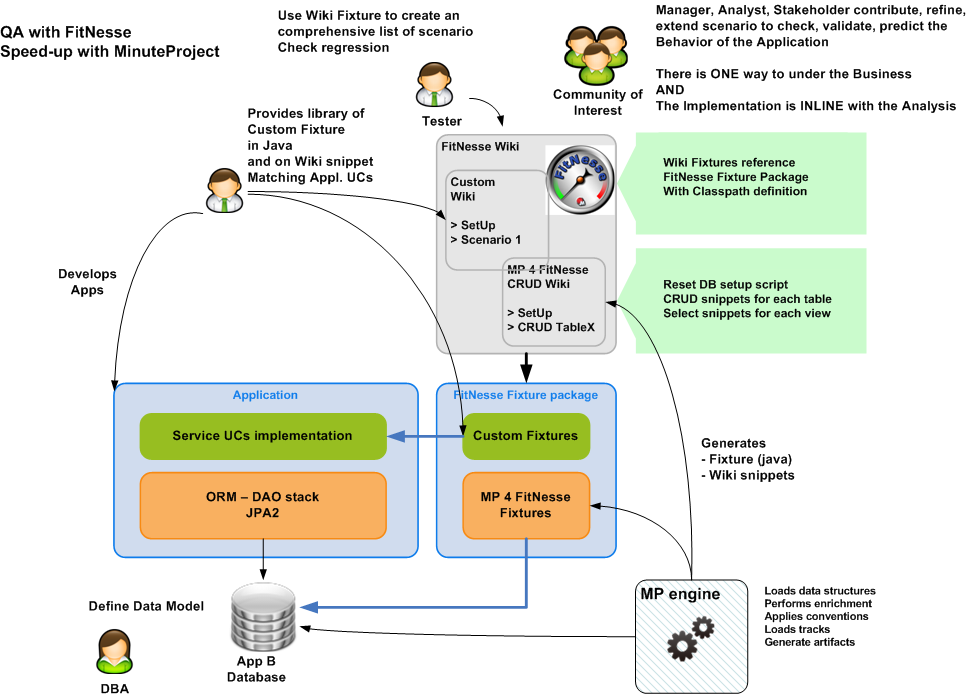
This article shows you how-to setup FitNesse in your development environment when dealing with Relation Database CRUD operations. MinuteProject 4 FitNesse generates entire set of FitNesse wiki pages and associated java fixtures allowing you to reset the database as well as performing intuitively CRUD operations on top of tables and Select on top of views.
To illustrate this MinuteProject track, the Database used comes from the Lazuly showcase.
The sources can be found under lazuly-fitnesse.
This page will show you:
  • FitNesse + Minuteproject operating mechanism in Agile development
  • How-to Generate CRUD fixture
  • Integrate then in your own scenario to gain QA
Overview


Install FitNesse and Generate A Custom CRUD wiki for you model
Prerequisites
  • Use Java 6
  • Install Lazuly DB (sql script here)
Installation
Download FitNesse
Execute java -jar fitnesse.jar
On a browser go to http://localhost to view the FitNesse wiki
Generate a FitNesse wiki for your model
  • Download MinuteProject
  • Generate using the following minuteproject configuration script: mp-config-LAZULY-FITNESSE.xml
  • Set this script in /mywork/config and run generate-model.(cmd/sh) mp-config-LAZULY-FITNESSE.xml
The mp-config-LAZULY-FITNESSE.xml configuration file
<!DOCTYPE root>
<generator-config>
 <configuration>
  <conventions>
   <target-convention type="enable-updatable-code-feature" />
  </conventions> 
  <model name="conference" version="1.0" package-root="net.sf.mp.demo">
   <data-model>
    <dataSource>
     <driverClassName>org.gjt.mm.mysql.Driver</driverClassName>
     <url>jdbc:mysql://127.0.0.1:3306/conference</url>
     <username>root</username>
     <password>mysql</password>
    </dataSource>
   </data-model>
   <business-model>
         <business-package default="conference">
             <condition type="package" startsWith="STAT" result="statistics"></condition>
             <condition type="package" startsWith="COUNTRY" result="admin"></condition>
             <condition type="package" startsWith="ROLE" result="admin"></condition>        
         </business-package>   
    <enrichment>
     <conventions>
         <view-primary-key-convention 
            type="apply-default-primary-key-otherwise-first-one" 
            default-primary-key-names="ID" >
         </view-primary-key-convention>
     </conventions>
    </enrichment>
   </business-model>
  </model>
  <targets> 
   <target refname="FitNesse" 
      name="default" 
      fileName="mp-template-config-fitnesse.xml" 
      outputdir-root="D:/DEV/LAZULY/lazuly-fitnesse"
      templatedir-root="../../template/framework/fitnesse">
   </target> 
   <target refname="LIB" 
      fileName="mp-template-config-bsla-LIB-features.xml" 
      templatedir-root="../../template/framework/bsla">
   </target>
  </targets>  

 </configuration>
</generator-config>
What is generated
Wiki Fixtures for CRUD operations


Wiki source to be copied in your FitNesse Root Directory


FitNesse CRUD Wiki generated for you model.
Pick-up the snippet you need to:
  • SetUp you DB model
  • Perform sanity check 
    • after X UCs in a scenario, are my data correctly stored?
Lazuly FitNesse subwiki for select operations


Details of Select wiki fixtures for view 'stat_mb_by_role'


Lazuly FitNesse subwiki for insert update delete operations


Details of Insert, Update, Delete wiki fixtures for table 'address'


Associated Java Fixture 


Assemble for your need
Build Java Fixture Project
Compile the code in an IDE
  • add src-generated to your source directories
  • add MP 4 FitNesse depencies libraries
    • For the moment they are provided in MP package under /target/fitnesse/ and /target/fitnesse/dep
  • Lazuly-fitnesse is shipped with an eclipse project that compiles the code to /bin
  • The compilation directory is to be reference by the FitNesse wiki path directives.
SetUp FitNesse Lazuly Wiki
Althought MinuteProject provides CRUD wiki ready to use, the purpose of this section is to setup a custom wiki that will be used for your UC.
  • Create your FitNesse Application Wiki HomePage
    • Edit main page add a section called 'FitNesseLazulyScenario'
      • Add snippet [[Lazuly][FitNesse.LazulyScenario]]
  • Click on Lazuly ? or go to http://localhost/FitNesse.LazulyScenario
  • Compose a simple structure
    • Simple structure proposal
      • HomePage section (define the path to use)
      • Setup section (Used to reset DB)
      • Data Definition section (Used to define common variables referenced in scenario)
      • Populate section (Used to initialize DB with data)
      • Couple of UC section
Write a sample scenario
This scenario will populate couple of tables of the Lazuly DB and check if the result expected in the views is correct.
HomePage section
Defines 
  • different pages (SetUp, VariableDefinition, UC sections) 
  • classpath

 
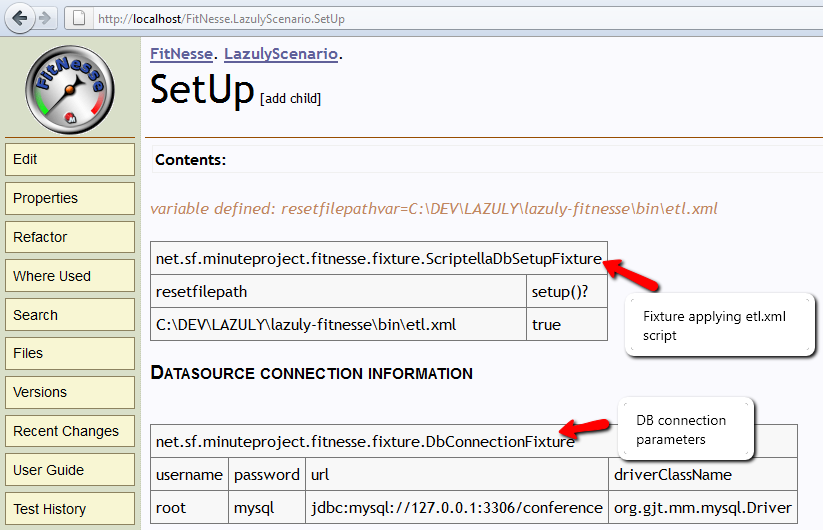
Setup section 
  • Reset Database
    • Reference Reset script executed by Scriptella (etl.xml)
      • Adapt the variable resetfilepathvar to point to your file path.
    • etl.xml references 3 sql script
      • reset_db.sql that proposed a Delete statement per table
        • It can be altered since the delete order might not be correct
        • In this case please add -- MP-MANAGED-STOP-GENERATING to prevent your modification to be lost for consecutive generation
      • insert_reference_data.sql
        • Add the data you wish
      • commit.sql that just perform a commit
  • Connection parameter to point to the database that include
    • DB URL
    • JDBC driver
    • Username
    • Password
  • All this code is generate in /ConferenceFitnesseWikiSetup/content.txt. It can also be copied from http://localhost/ConferenceFitnesseWikiSetup
 
Variable Definition section
Use Fitnesse directive !define to add relevant variable name for your scenario
Those variables will be later refered in your UCs

Populate section 
The SetUp page is automatically included at the beginning of your scenario.
But you have to reference the Variable Definition section. For that use the FitNesse directive !include (!include VariableDefinition)

Pick-up CRUD snippet from MP generated FitNesse Wiki to create you own customed DB initialization.
Insert reference data Country, Role
Insert business data: Address, Conference, ConferenceMember


UC Check section
Pick-up CRUD snippet from MP generated FitNesse Wiki to create you own customed DB initialization.
In this case, I simply check that the data are stored correctly.
There is a view that gather BI information and I use it to validate the correctness of the information.


Conclusion
This example shows that you can have use very easily CRUD fitnesse fixture (Zero LOC of development are required) customized for your data model.
To sum-up, here are the main points:
  • Reset DB
  • Initialize DB
  • Perform sanity check
  • Set-up FitNesse for your hadoc UCs for JEE data centric application


MinuteProject Spin-offs
At this point on you can guarante that the data retrieved from the view are correct.
That means that you have QA on your model.
If the views have a field containing unique values then you can benefit of MinuteProject spin-off i.e. use other track to generate out-of-the-box:
  • Web2.0 application in Openxava on top of views. See on this blog the following article 
  • REST application.
  • Web service application.
For Real UCs
Here the UCs demonstrated concern only CRUD operations on top of DB entities.
2 next articles in prepartion will show how to integrate with:
  • JPA2 ORM backend
  • Spring/JPA/Hibernate backend
Additional information
MinuteProject 4 FitNesse